Updates
Latest improvements and features
Stay on top of every new feature, improvement and fix in FITIZENS.
Your training partner keeps evolving.
4.9 - Upload, analyze, share
Until now, to analyze your technique you had to record inside the app. If you already had the video on your phone, there was nothing you could do with it. And if you wanted your coach to see the full analysis, you had to explain it over WhatsApp. Both of those change today.
📂 Analyze videos from your gallery
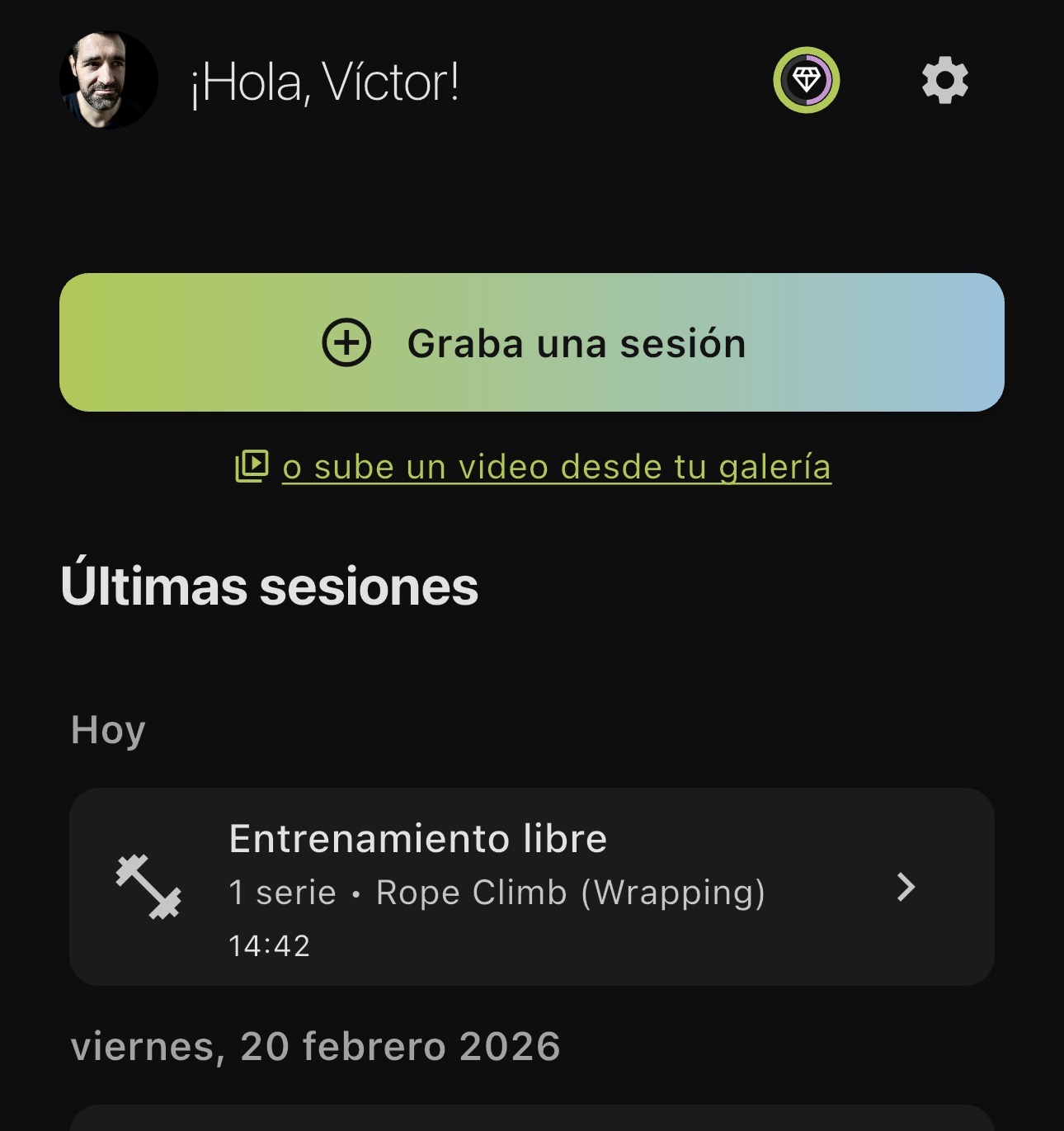
On the home screen, right below “Record a session”, you now see the link “or upload a video from your gallery”. One tap and your gallery opens.
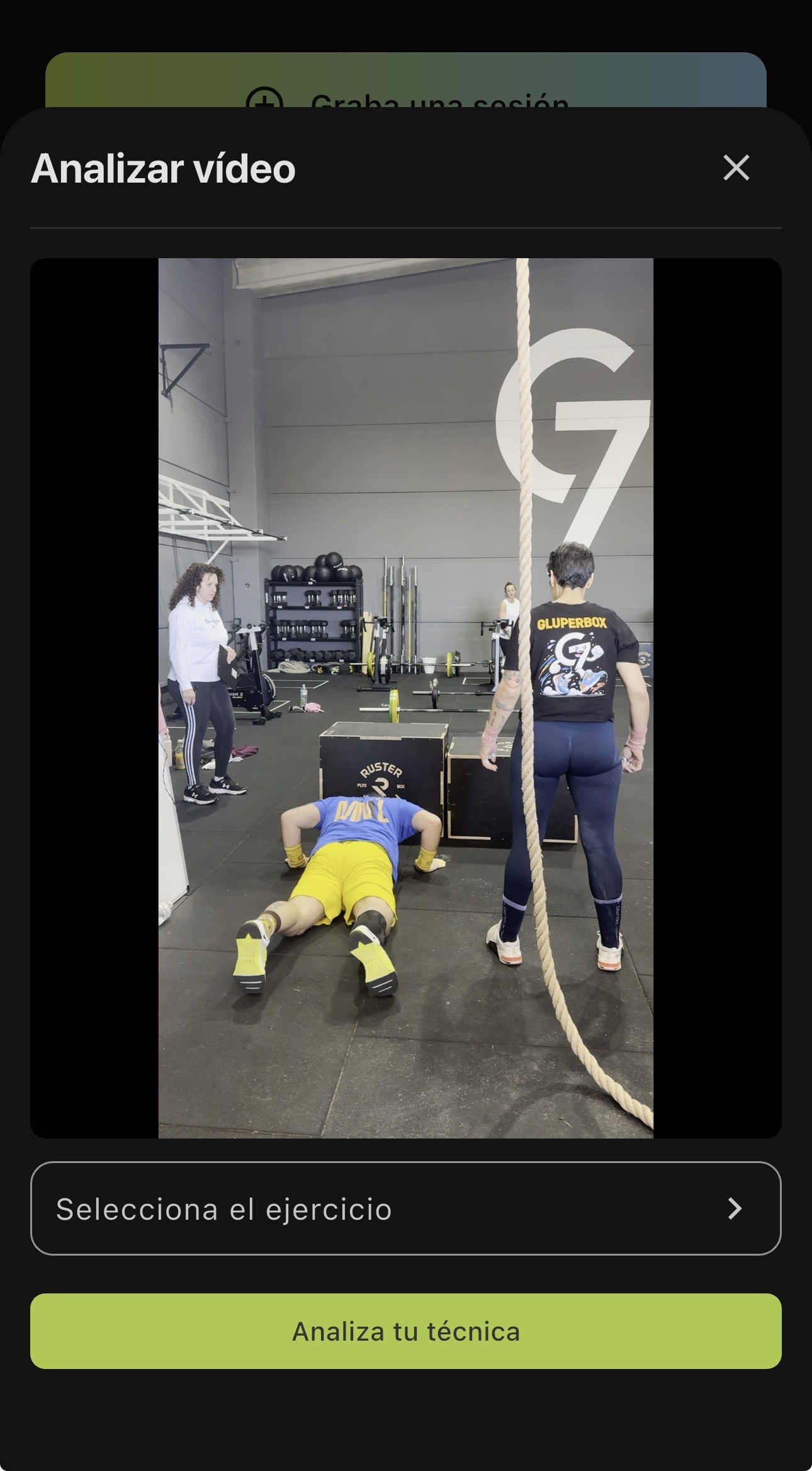
Pick the video, a panel opens with a playable preview, an exercise selector and the “Analyze your technique” button. The video goes through the usual process: compression, upload, analysis. The report you get back is exactly the same as if you had recorded it inside the app.
That video your training partner took last week, the set you saved a month ago, the video your coach sent you to review. All of that is now analyzable.
If the video is horizontal or longer than what your plan allows, the app warns you before processing. It’s a warning, not a wall: you decide whether to run the analysis.
🔗 Share your session with a link
Generate a link from any session and send it over WhatsApp, email or wherever you want. Whoever opens it sees exactly what you see: the videos of every set, the rep-by-rep analysis, the full feedback. All in read-only mode, no account needed.
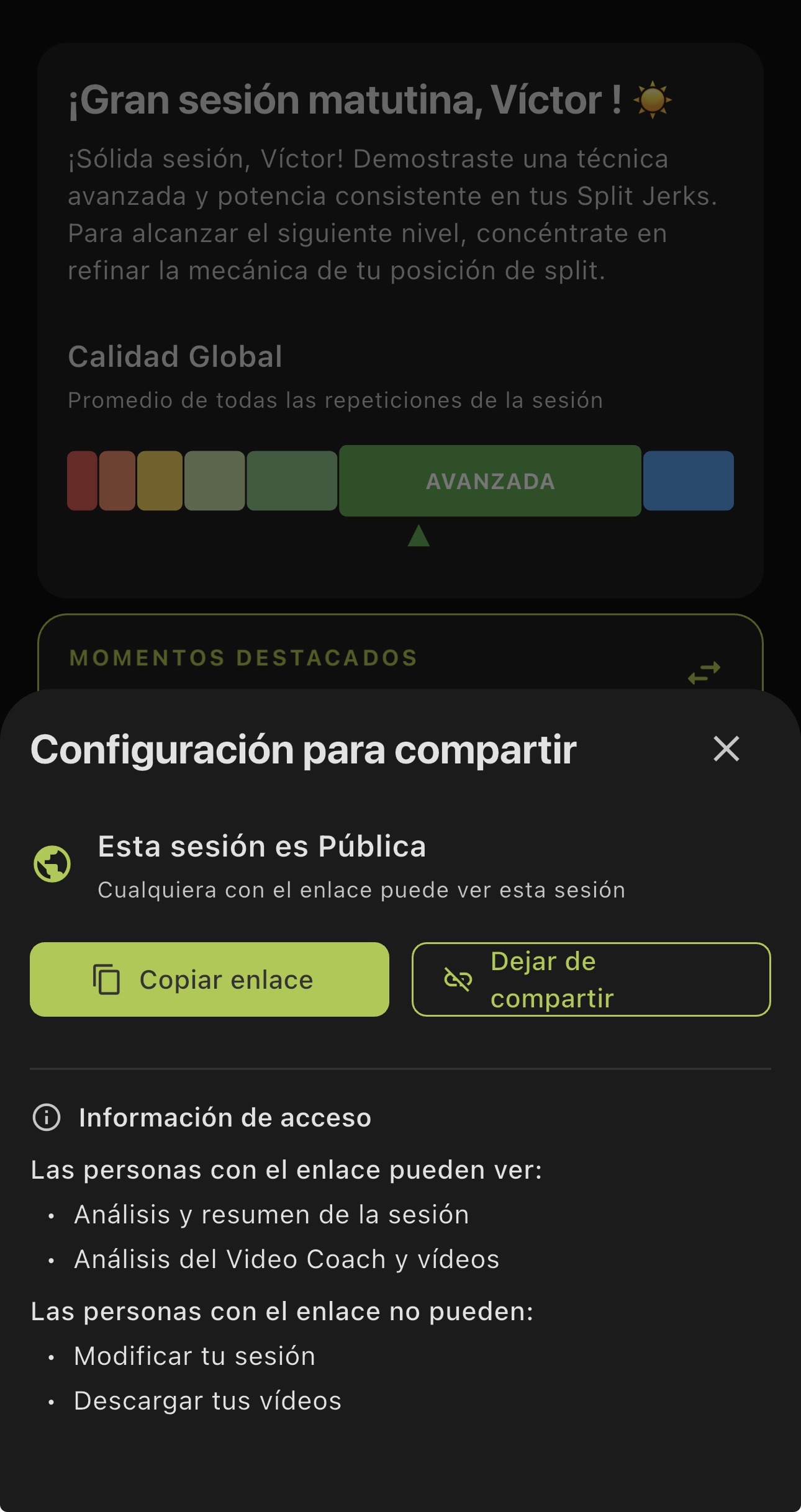
From the share settings you can copy the link or revoke it if you no longer want it accessible. You decide who sees your data and for how long.
This is different from the videos and cards from v4.6. Those were built for social: an image, a clip. The link is for someone to see your full session with all the detail.
🎯 Filter exercises by purpose
The catalog has more than 500 exercises. Finding what you’re looking for was already possible by family and muscle group. Now you can also filter by purpose: strength, power, conditioning, mobility and five more categories.
Tap the chip, pick one, and the catalog narrows down to what you need.
Update and get use out of the videos you already have.
4.7 - Revisit every session
Two new things: find any session in seconds, and ask the AI to run an analysis again if the rep count isn’t right.
📅 Your sessions, organized
Your sessions have always been there. But finding that set of cleans from last Tuesday meant scrolling until you hit it.
You now have a monthly calendar. The days you trained are marked. Tap a day and you only see the sessions from that date. Tap the week number and you filter the whole week.
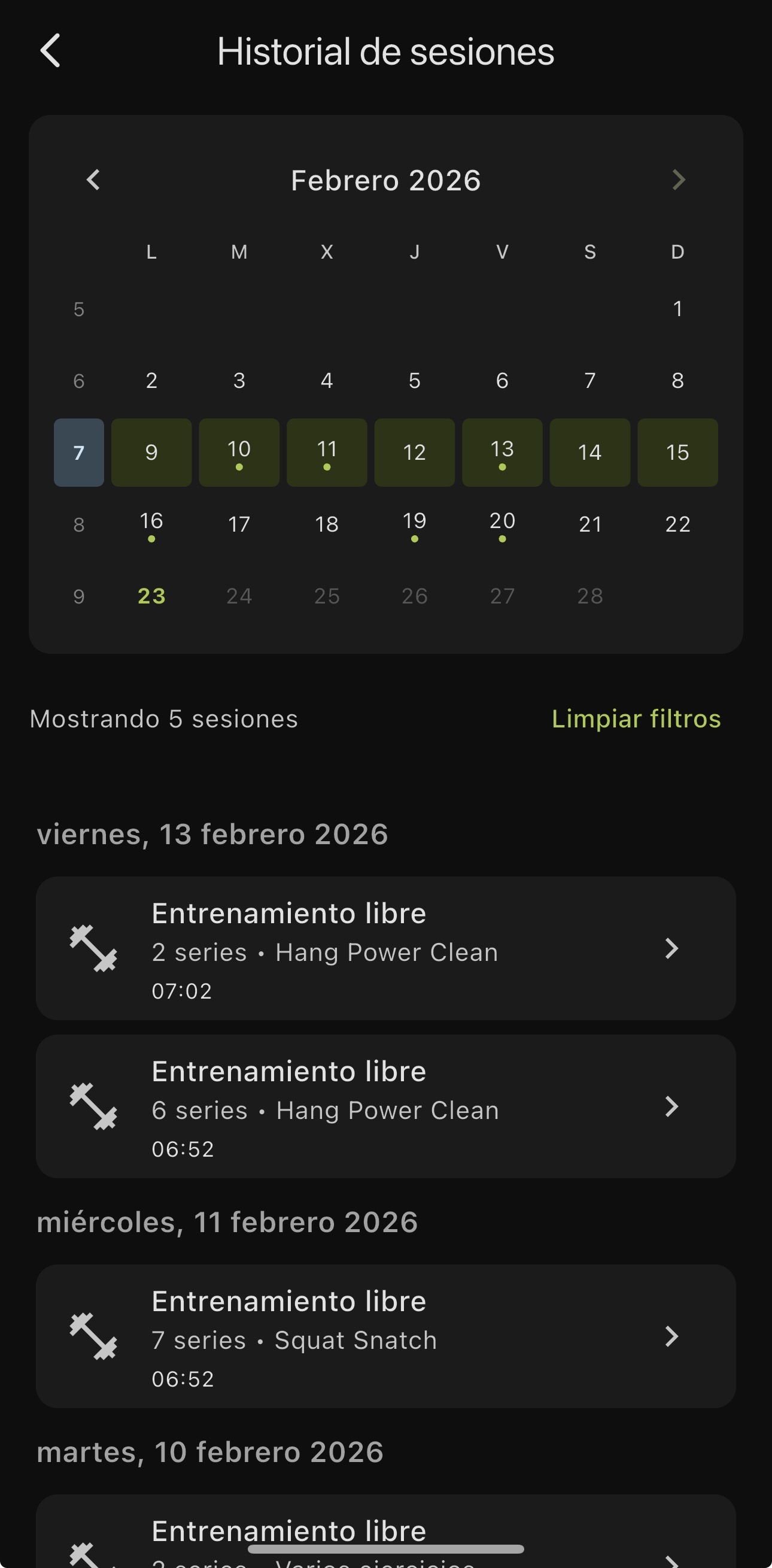
The home screen now shows your 5 most recent sessions with a “See all” button that takes you to the full history.
🔄 Request a re-analysis
Sometimes the AI miscounts reps. It detects 4 instead of 5, or groups two into one. Before, there was nothing you could do about it.
Now, under each set analysis you see the link “Is the rep count wrong?”. One tap, confirm, and the AI re-analyzes the video from scratch. No re-recording, no waiting around. It uses one analysis credit from your plan.
🔧 Under the hood
- Fix to the full-screen analysis view. The set video now shows the correct analysis at all times.
- UI polish and bug fixes.
Update and go back through your sessions.
4.6 - Share your training
In v4.4 your coach learned to see better. In v4.5, to show you the feedback so you’d actually use it. In v4.6, your analysis leaves the app. Send it to your coach, your training partners or post it on Stories.
📤 Share your training
Until now, your analysis stayed inside the app. If you wanted to show your progress to someone, you had to take a screenshot and explain the context. That’s over.
You now have three ways to share what you do, each built for a different moment.
🎬 Share your rep as a video
Pick any rep and generate a 9:16 vertical video ready to post on Instagram Stories, TikTok or wherever you want. The video shows your rep with an animated overlay: exercise name, date, weight and quality bar.
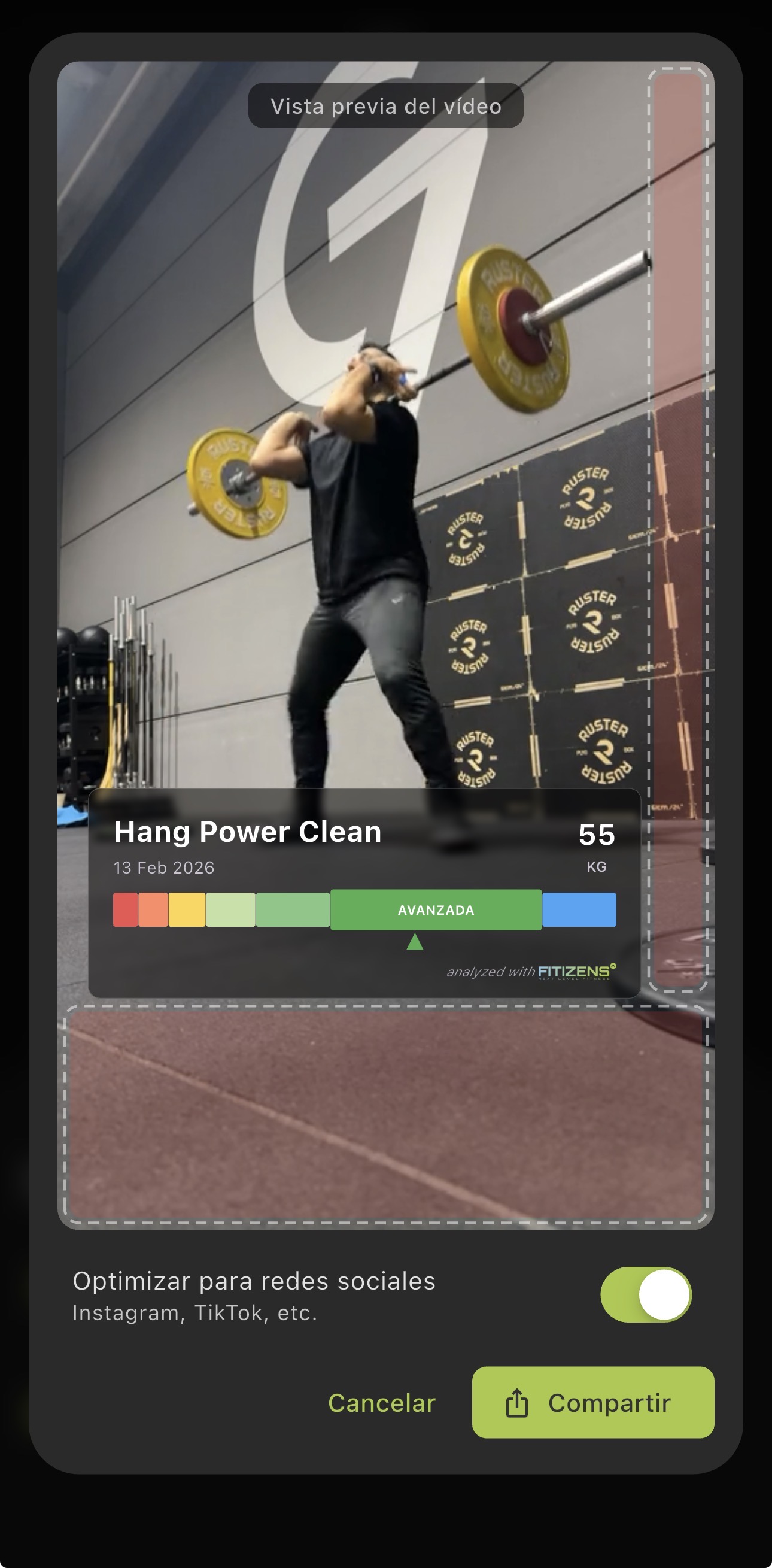
It’s not a screenshot with text on top. It’s a video built for social: vertical format, clean overlay, the right amount of info. Flip the “Optimize for social” toggle and the result is ready to post without editing anything.
Your best snatch rep at 80 kg, with your quality level visible, shared on a story in 10 seconds.
🃏 Share your set summary
You don’t always need video. Sometimes you want to send something quick to your coach or your training group.
The set card is exactly that: a visual card with the exercise name, date, your quality level, the best rep, the rep count, time and a short AI feedback summary.
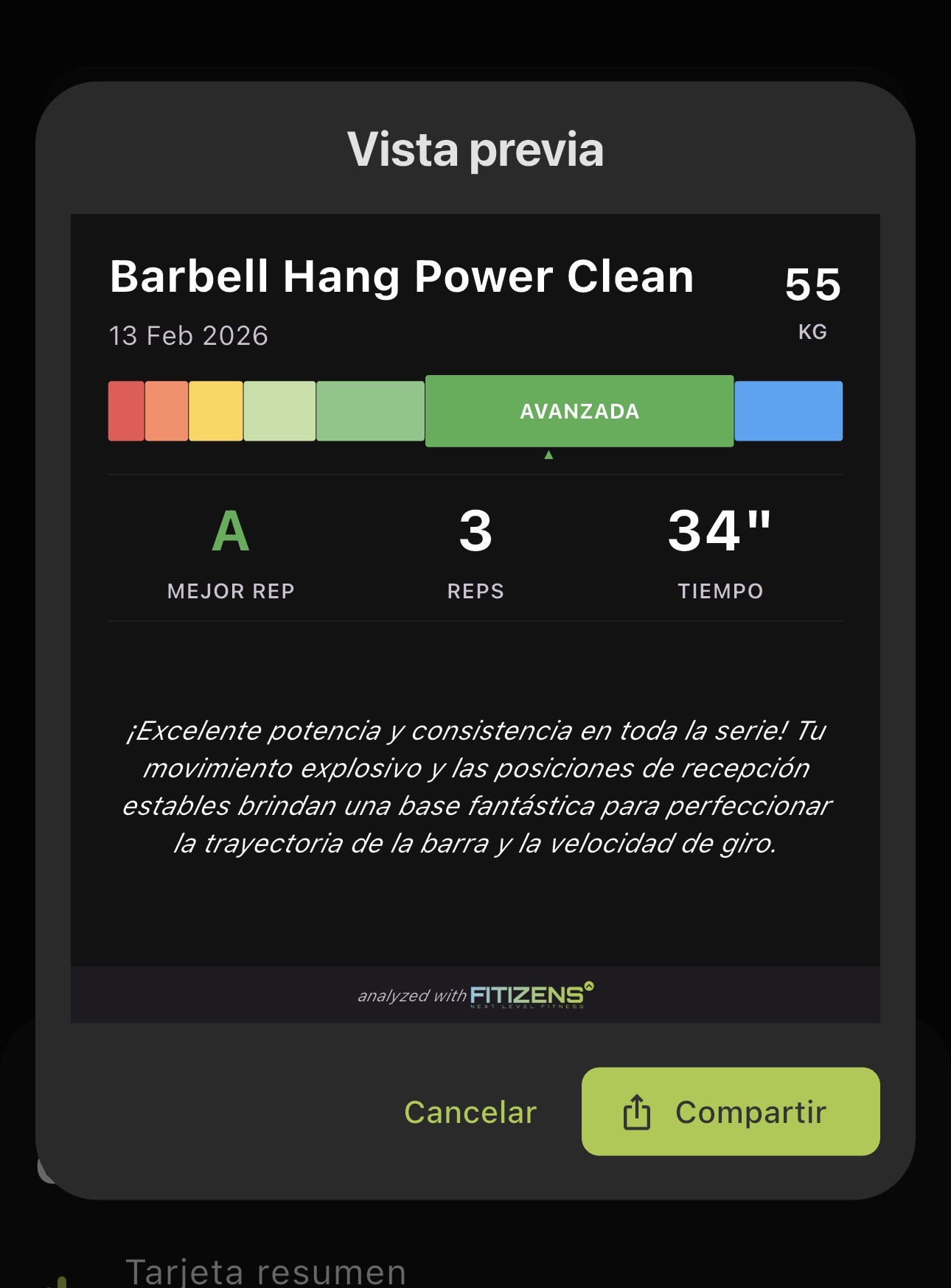
Perfect to send over WhatsApp after training. Your coach sees how the set went at a glance, without needing access to your app.
📋 Share your session summary
And if you want to share the whole session, the session card rolls it all up: number of sets, total volume in kilos, heaviest weight, total time, and a set-by-set breakdown with quality, weight and reps.
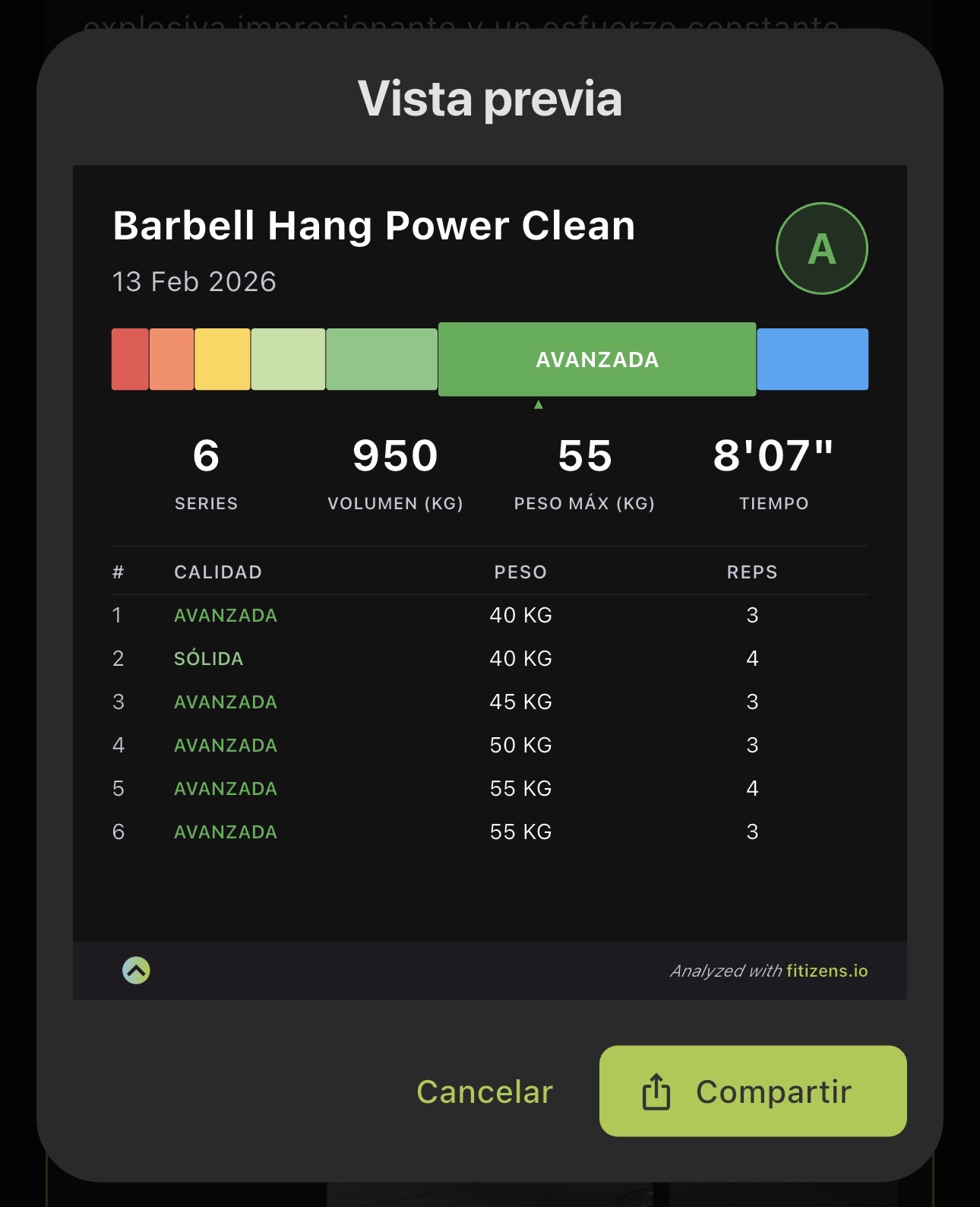
You just did 5 sets of front squat and 3 of push press. Instead of explaining how it went, you share an image that sums it all up. Your training partner, your coach or your WhatsApp group see exactly what you did and how you did it.
🏋️ Visual weight selector
Choosing the weight before you record is a different experience now. The new selector shows a bar with the plates loaded in real colors: yellow for 15 kg plates, red for 25 kg, and so on for every standard disc.
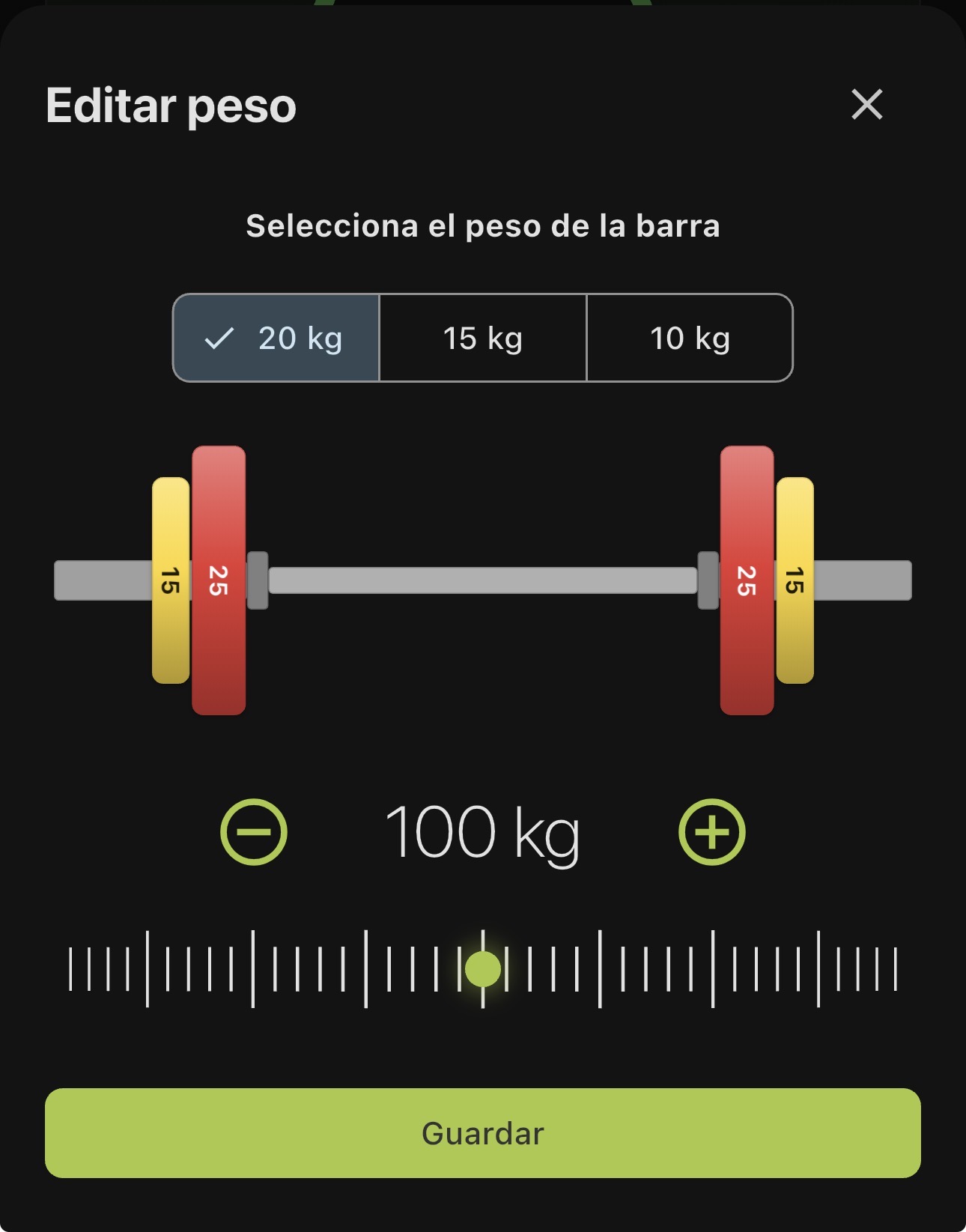
Pick the bar type (20, 15 or 10 kg), move the slider to adjust the total weight and see the bar build in real time. It’s immediate: you’re not entering a number, you’re looking at your bar. If something’s off, you spot it before you hit record.
A small detail that changes how you interact with the app before every set.
🪟 Your feedback without leaving the video
In the full-screen view, a frosted-glass bar now appears at the bottom with the key info: exercise name, set, rep, weight and the feedback chips.
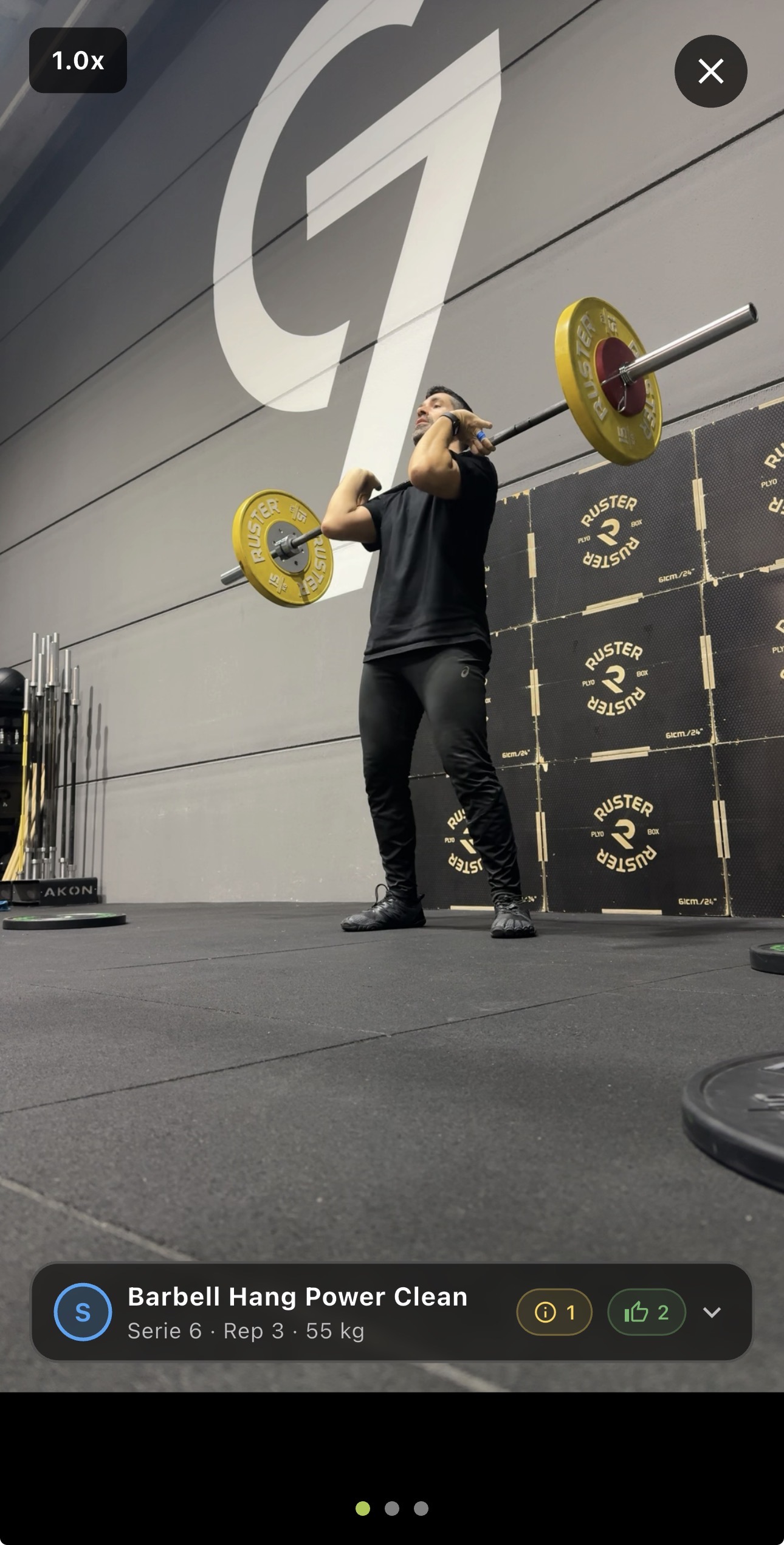
At a glance, without pausing the video, you know what’s happening on that rep. But if you want the full detail, tap the arrow and the overlay expands: AI text, individual criteria with icons and highlighted coaching cues. All without leaving full screen.
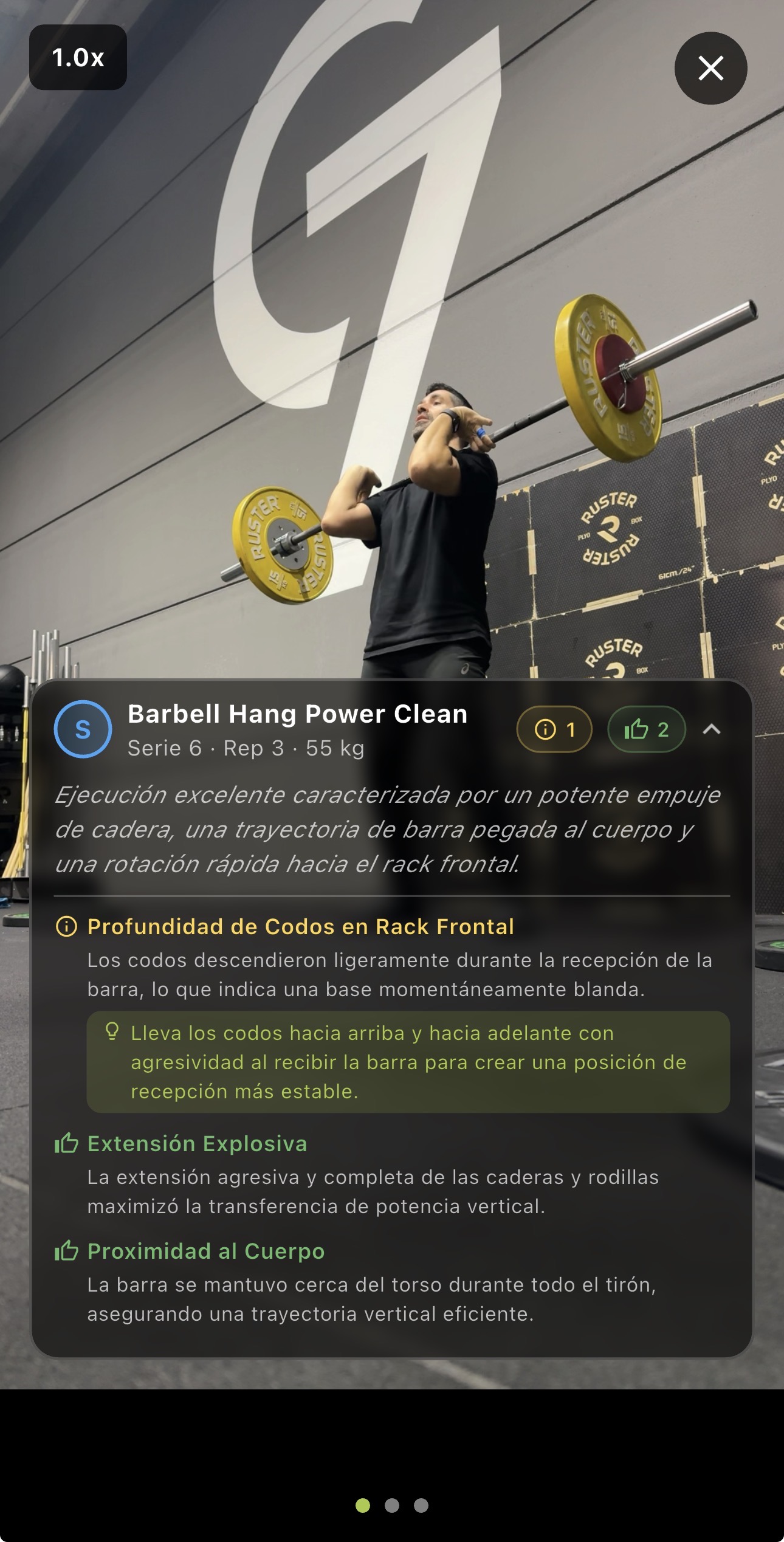
Before, to read the feedback you had to leave the video, find the right section and then come back. Now the feedback lives where it should: on top of your movement.
🔧 Under the hood
Things you won’t see, but you’ll feel:
- Non-intrusive post-set feedback. After recording a set, feedback now shows up as a self-dismissing toast instead of a dialog that blocks the screen until you tap “OK”. Fewer interruptions, more flow.
- Analysis packs when you need them. When you hit the limit on your credits, the app shows you the pack options at the right moment, without having to dig into settings or the web.
- Login/signup flow upgrade. Signing in and signing up is cleaner and takes fewer steps.
- Video player stability. Several fixes so playback is more solid, especially when you navigate fast between reps.
Update now and let your training show.
4.5 - Every rep, a swipe away
Before, reviewing your reps meant opening accordions, tapping, waiting, going back. Now you swipe, watch and move on. In v4.4 your coach learned to see better. In v4.5, it shows you the feedback in a way you’ll actually use.
🎠 Your reps, at a glance
Until now, to review the reps in a set you had to open an accordion and go through them one by one. That’s done.
You now see a carousel with the video of every rep and its detail panel below. You swipe between reps the way you swipe through photos on your phone. See the video, see the feedback, move on. No button chasing, no losing focus.
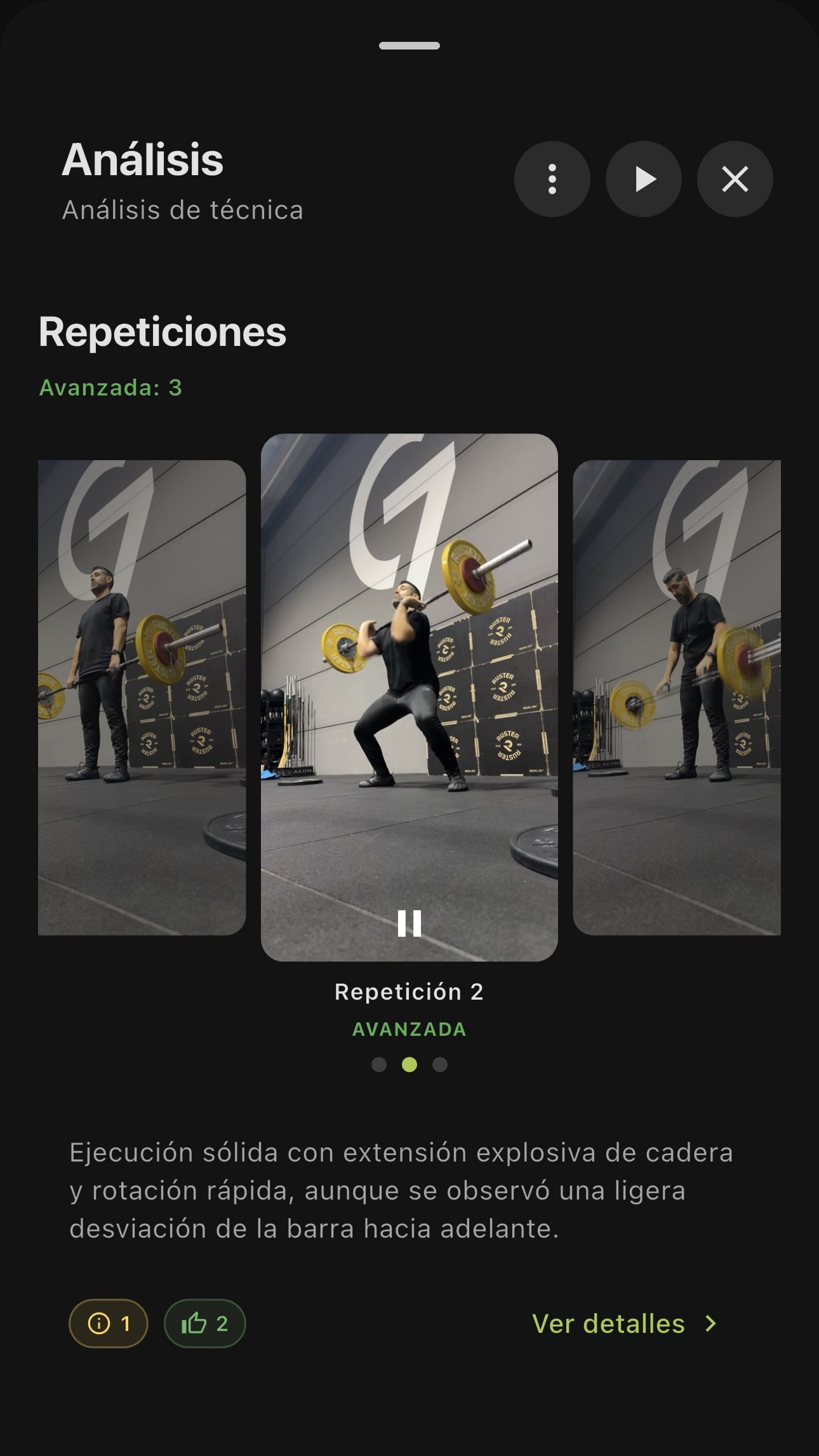
The difference is immediate: instead of opening and closing sections, you flow between reps. You see rep 3, notice something odd, swipe to rep 4 to compare. You review the whole set in seconds and spot your best and worst rep without effort.
📱 Swipe between reps in full screen
When you expand a video to see it big, you’re no longer trapped on that rep. Now you swipe horizontally to jump to the next or previous rep without leaving full screen.
Imagine reviewing a set of 8 snatches. Before: tap a rep, watch it, go back, tap the next one. Now: tap the first one and swipe. Rep 1, rep 2, rep 3… without losing focus, without losing the mental comparison between them.
Comparing reps stops being work and becomes natural.
💬 Feedback that reads itself
Rep feedback now starts with visual chips that sum up what matters: what went well, what needs work. At a glance, no paragraphs to read.
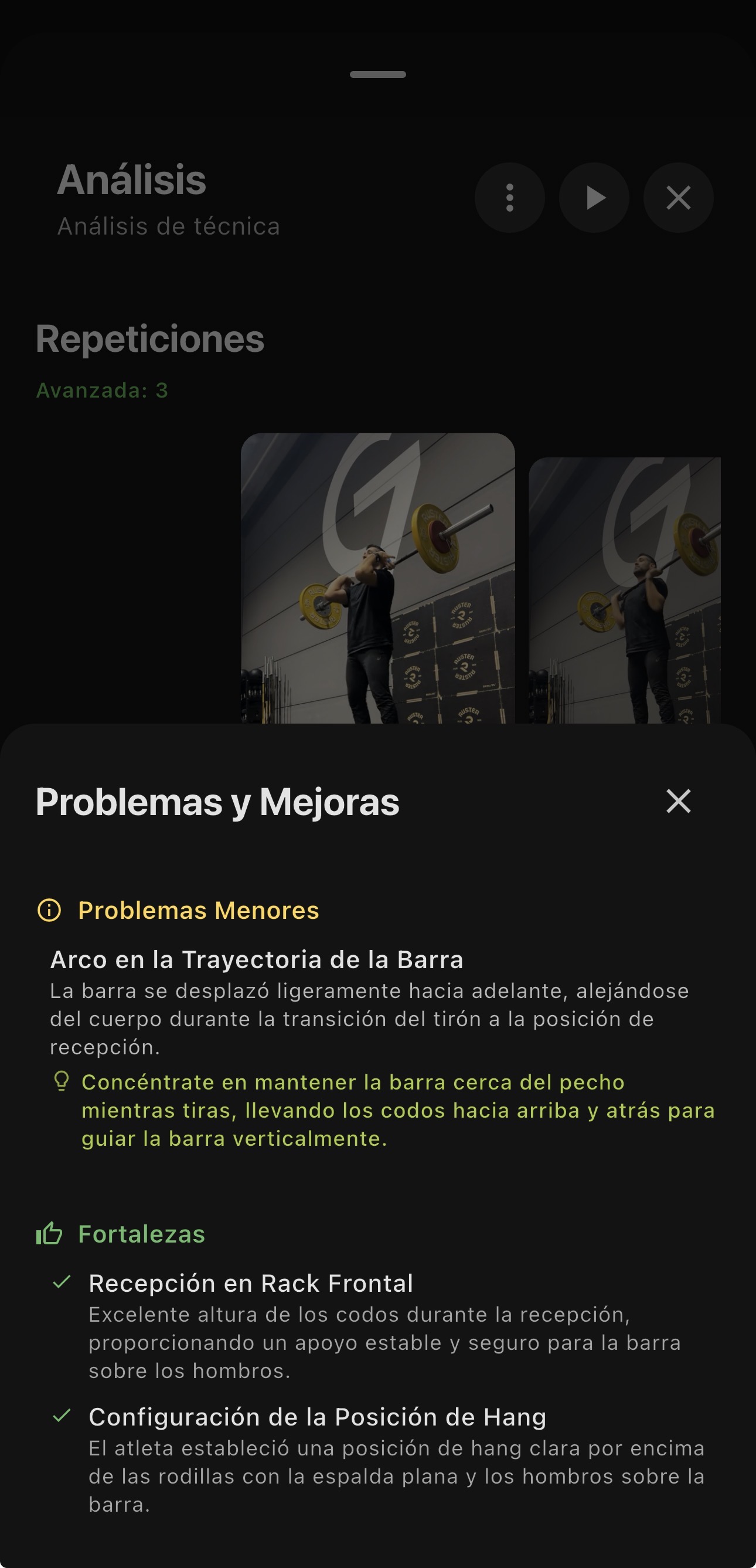
If you want the full detail, tap any chip and a bottom sheet opens with the extended explanation. But if you just need the quick summary between sets, the chips give it to you without interrupting.
It’s the difference between your coach saying “knees” and your coach explaining for two minutes why the knees. Sometimes you need the first. Sometimes the second. Now you get both.
⚖️ Fix the weight after you train
You got the weight wrong before recording, or forgot to enter it altogether. You no longer have to live with that bad data.
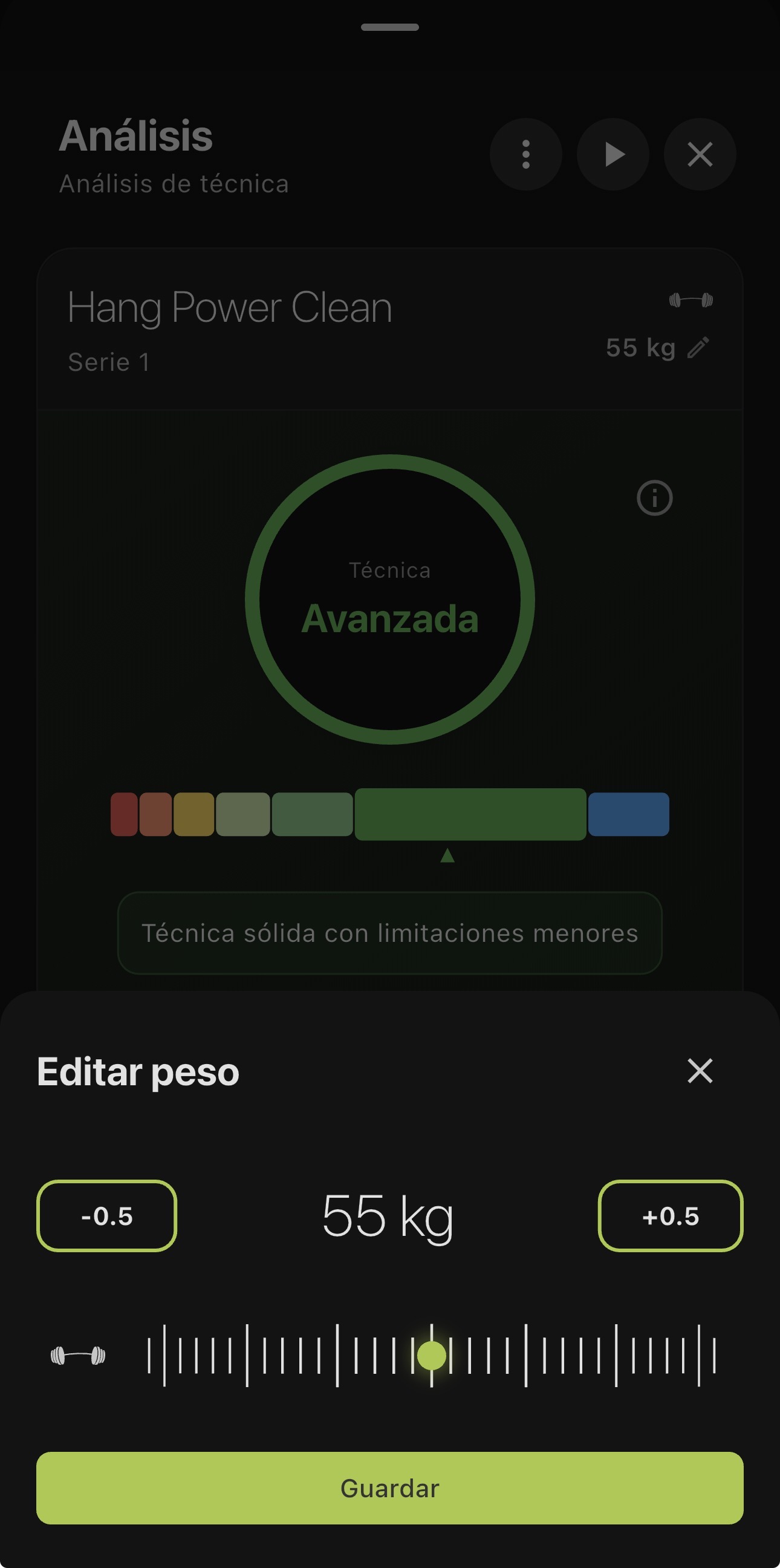
You can now edit the weight after finishing the set. One tap, change the value, done. Your history, your volume and your progress reflect what you actually lifted.
🔧 Under the hood
Two things you won’t see, but you’ll feel:
- More robust video compression. Processing now uses your phone’s native engine as the first option, with an automatic fallback if something fails. Fewer upload errors, especially on older Android devices.
- Smart video cache. The videos you watch in the app are cached for 30 days: the second time you open a rep, it loads instantly. And if you need to free up space, there’s a new control in Settings to manage it.
🎁 Analysis packs: buy extra credits
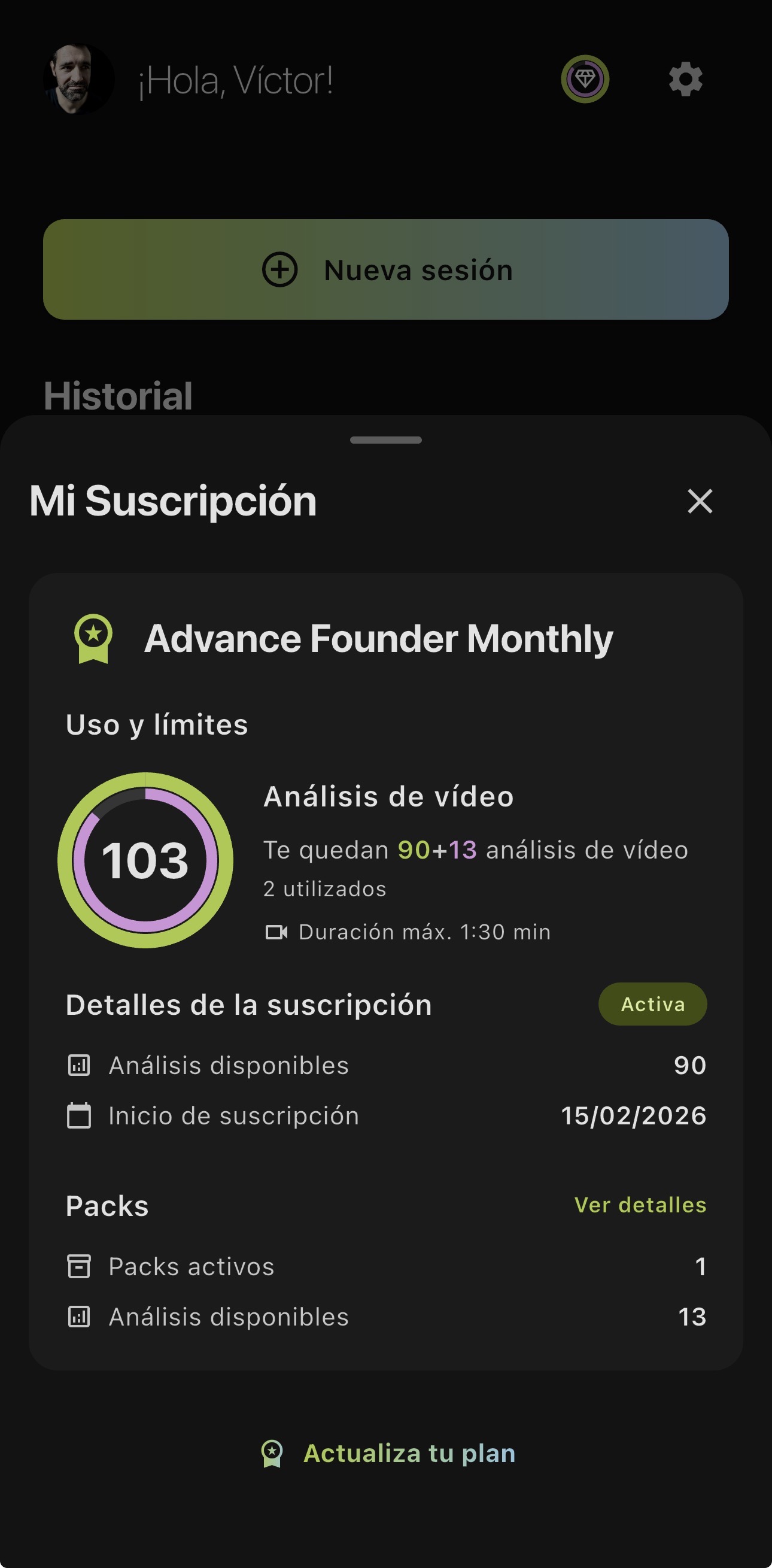
New: you can now buy extra analysis packs directly from the web, with a one-time payment through Stripe. No subscription, no commitment. Ideal when you need more analyses in a given month or prefer not to tie yourself to a monthly plan.
Check the available options on our pricing page
And if you already have an active pack, you now see it directly on the usage screen in the app: how many credits you have, how many come from the pack and when they renew. No surprises.
Update now and swipe between your reps the way it should have always been.
4.4 - Your coach rewinds and watches again
Same video. More eyes on it. The AI now reads your training like a coach who rewinds the footage.
🔁 The AI watches your video several times
Until now, the AI saw your video once and gave its verdict. Now it reviews it several times, and each pass focuses on something different: position, tempo, range of motion, stability.
It’s like a coach who records your set and then rewinds to look first at the knees, then at the hips, then at the pace. That’s what the AI is doing now. The direct result: feedback that reflects what’s really happening in your video. If your position is correct, your analysis confirms it. No noise, no guesses.
🌧️ Works better in tough conditions
In the previous version we improved how the AI handled awkward angles. This time the jump comes from somewhere else: by reviewing your video multiple times, the AI separates what it can see clearly from what it can’t. Before, it did a single pass and had to decide with whatever it caught. Now it goes back, reviews from a different angle of attention, and builds a more complete read of your movement.
Someone walking in front of the camera, low light, the bar blocking part of your body. The AI no longer bets everything on one look.
🎬 Every rep, complete
Before, when you reviewed a rep, the video sometimes started with the movement already halfway through, or cut off before the end. Now the AI picks better where each rep starts and where it ends.
When you review your reps, you see the setup, the execution and the finish. Nothing cut off, nothing half shown. And as a bonus: by identifying the boundaries of each rep more accurately, the rep count is more reliable too.
⏳ A bit more wait, a lot more result
Reviewing your video several times has a cost: the analysis takes a bit longer. But the jump in feedback quality pays for those extra seconds.
More depth and more precision in exchange for a little more patience. A tradeoff worth making.
Update now and train with a coach that doesn’t stop at first impressions.
4.3 - Train without interruptions
Less time fighting the app. More time training.
🧠 More robust technique analysis
We’ve upgraded the analysis model so it holds up better in tough conditions: awkward angles, objects blocking part of the movement, or low light.
The system focuses better on what it can see clearly, giving you feedback that’s more reliable and more useful for your training.
⏱️ Faster stop button
You now only need to hold the button for 0.7 seconds (it used to be 2). A 65% reduction in the wait means you end your sets instantly and keep the rhythm of your training.
The progress bar now shows at the top of the screen, so it doesn’t hide under your thumb. And when you let go, the app vibrates to confirm the set was recorded.
⚖️ The app remembers your weight
If you do a Back Squat with 70 kg, switch to Pull-Ups and come back to Back Squat, the app already has 70 kg loaded. No need to enter it again.
Especially useful during supersets, EMOMs or circuits.
🎥 Your videos process better
We fixed an issue where some phones failed to process videos after a workout. It now works across every device, no matter which model you have.
🔧 Other improvements
- Your videos no longer get deleted from your phone until we confirm they uploaded
- Visual tweaks in dark mode for better detail
- Minor stability fixes
Update now and train without interruptions.
4.2 - Your personal coach wraps up every session
This is one of the biggest updates we’ve shipped. When you finish your training session, your AI coach now looks at EVERYTHING you did and gives you a full summary: what went well, what to improve, and exactly what to focus on next time.
🧠 AI session summary
Until now, FITIZENS analyzed each set on its own. Now it goes much further: when you finish your session, the AI looks at your whole workout and generates a smart summary.
What’s in your session summary?
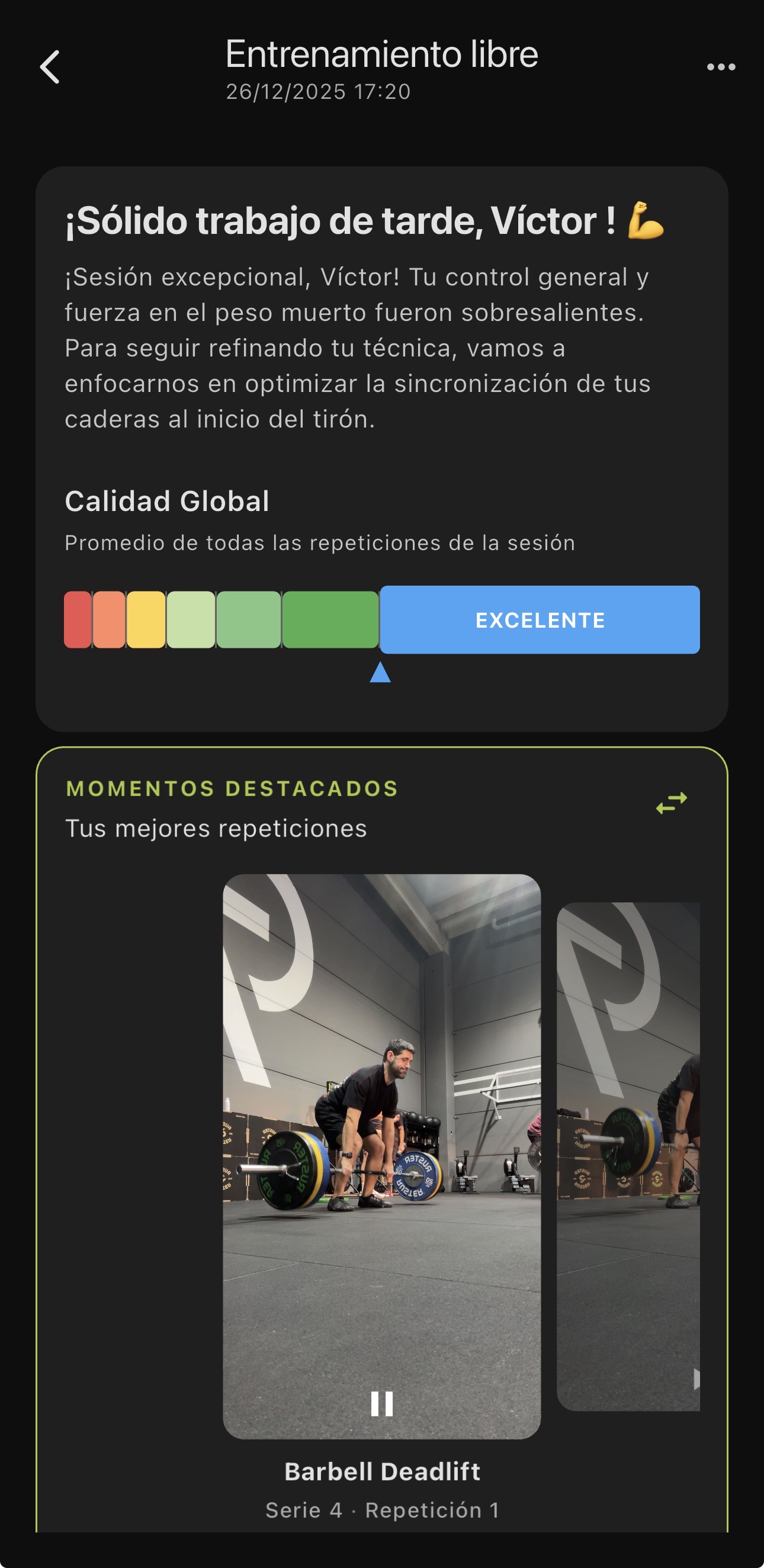
- Coach Summary: an overall read of your session written by the AI, as if your coach gave you feedback at the end
- Your Strengths: what you did well and should keep doing
- Areas to Improve: specific technical points to work on
- Overall Quality: your average technical level across the session
Session stats
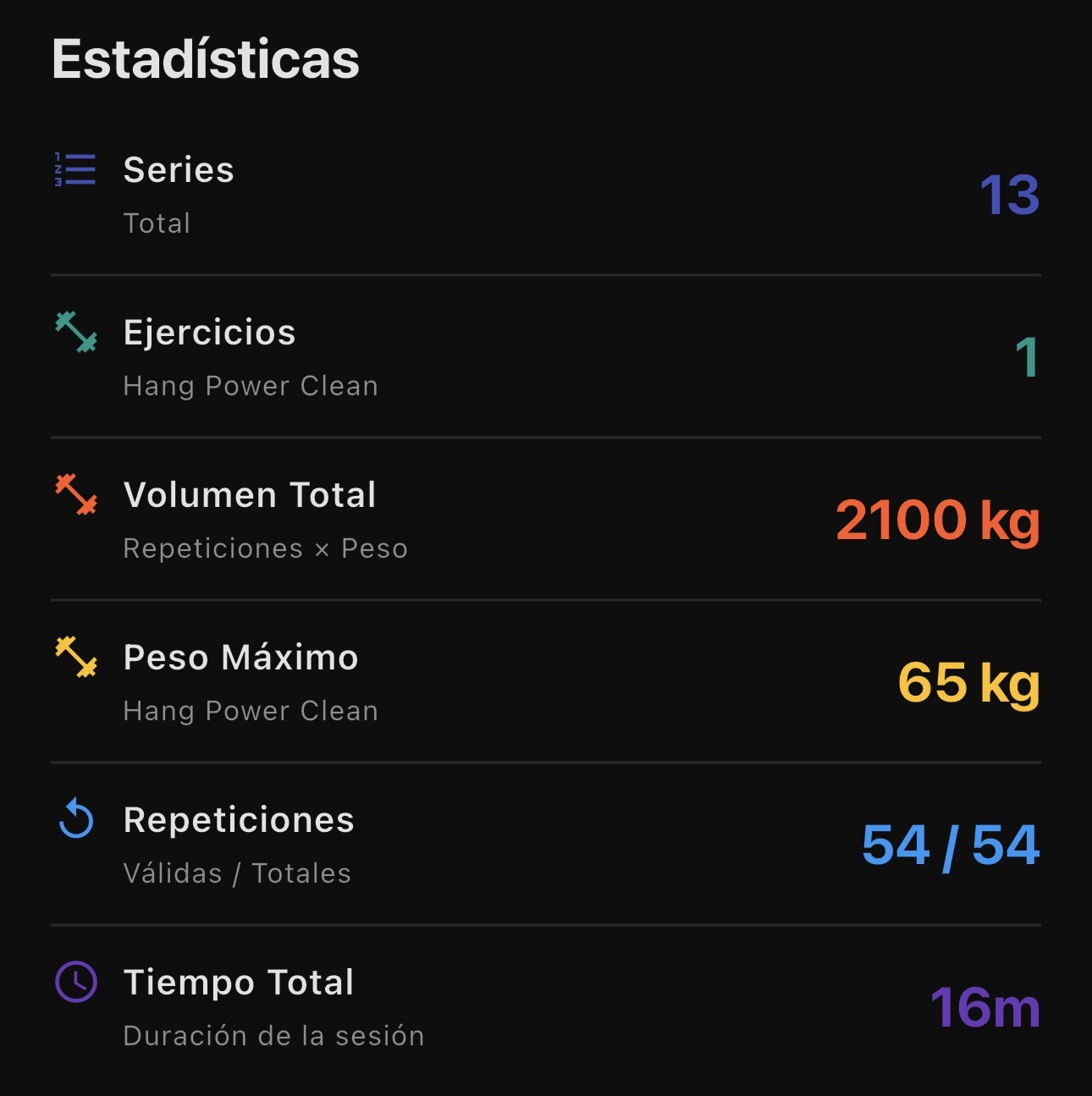
At a glance, every key number from your session: total sets, exercises, total volume, heaviest weight, valid reps and total time.
Videos of your best reps
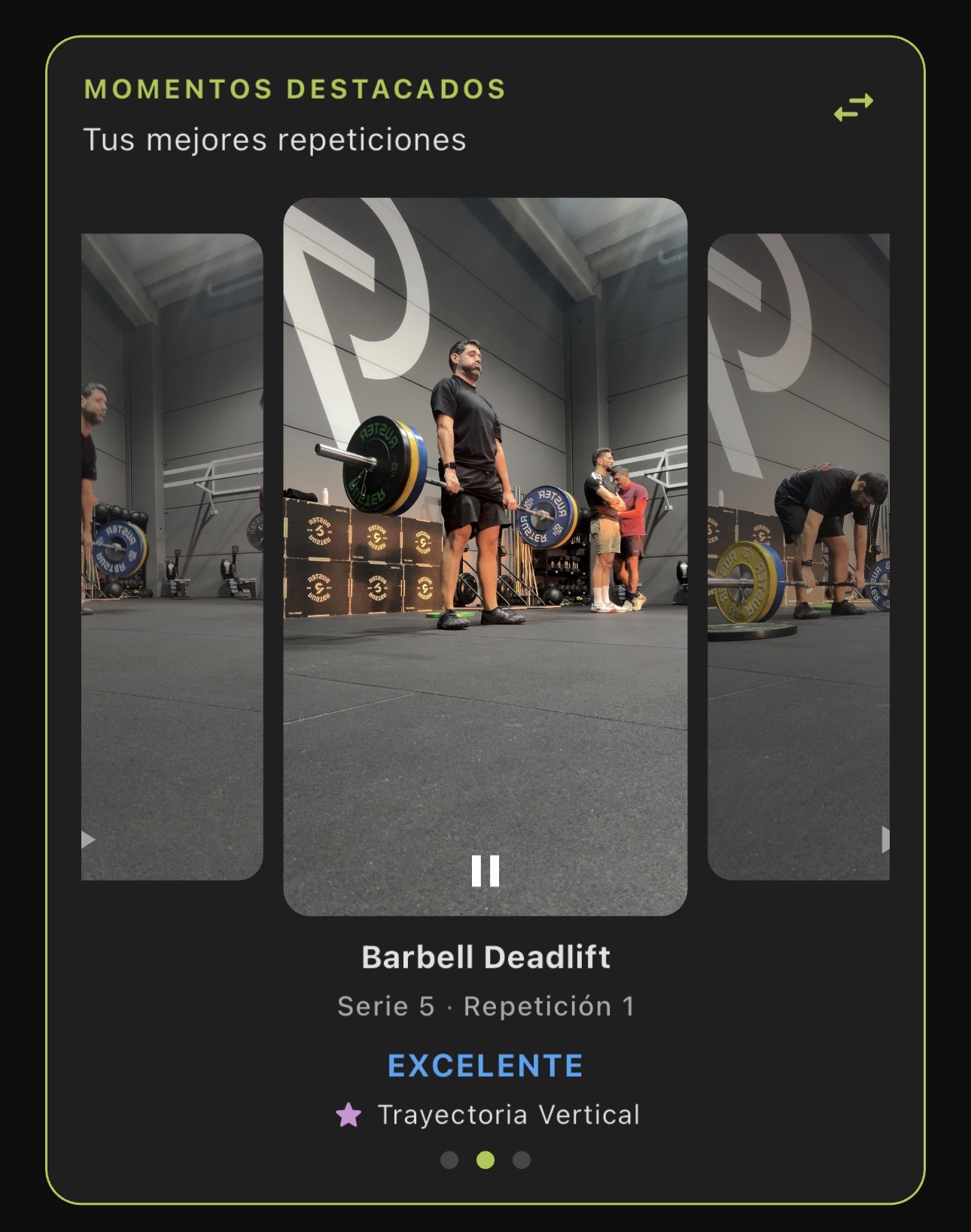
The summary gives you direct access to the videos of your best reps of the session. You can see exactly what you did well and replicate it.
Key focus point
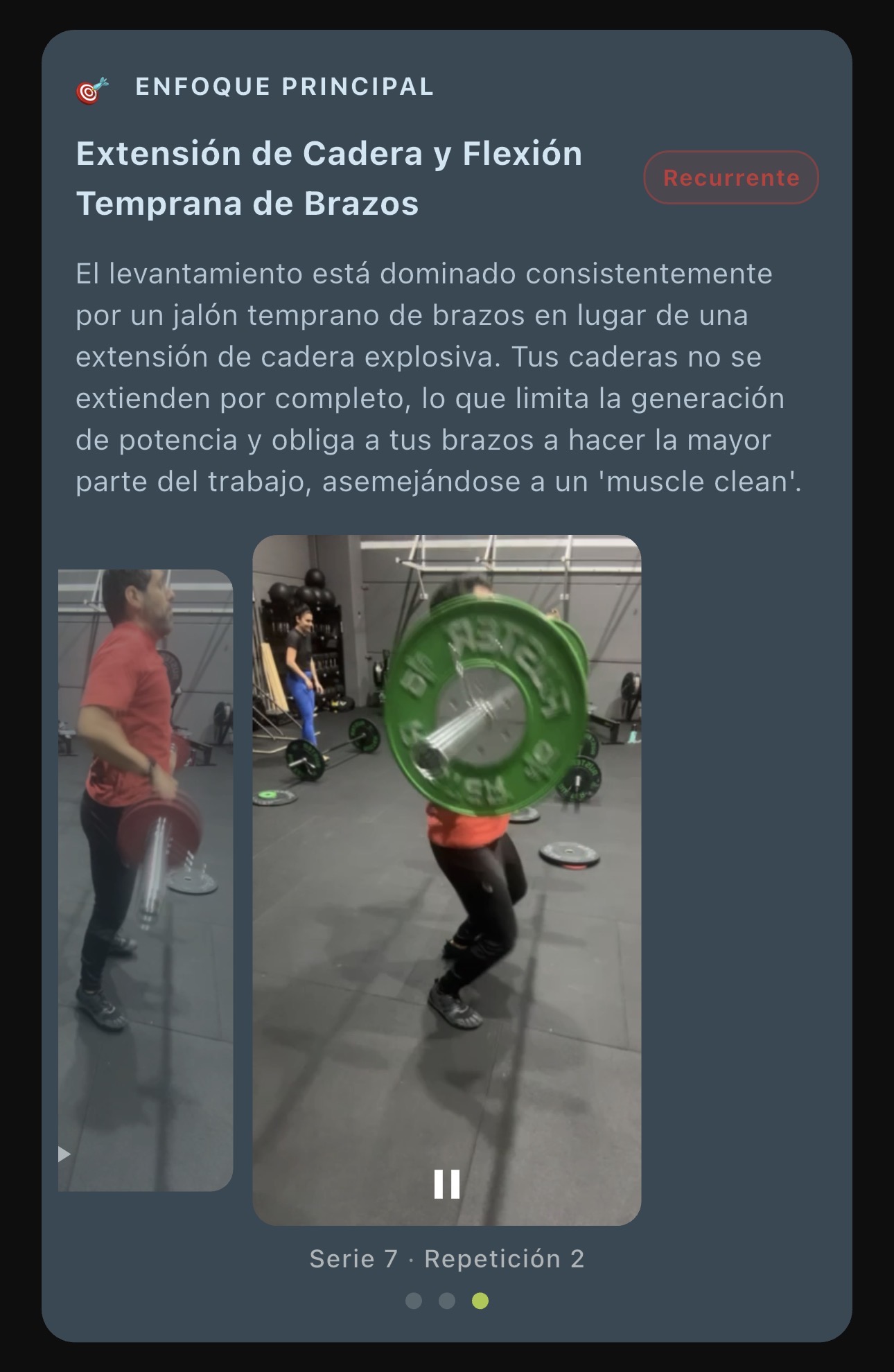
The AI picks ONE key thing to focus on. Not an endless list of corrections, but the single most important thing for your progress right now. It includes:
- A clear explanation of why it matters
- Evidence videos showing the reps where the issue is most visible
- “Recurring” badge if it’s a pattern that shows up repeatedly in your technique
Recommended work
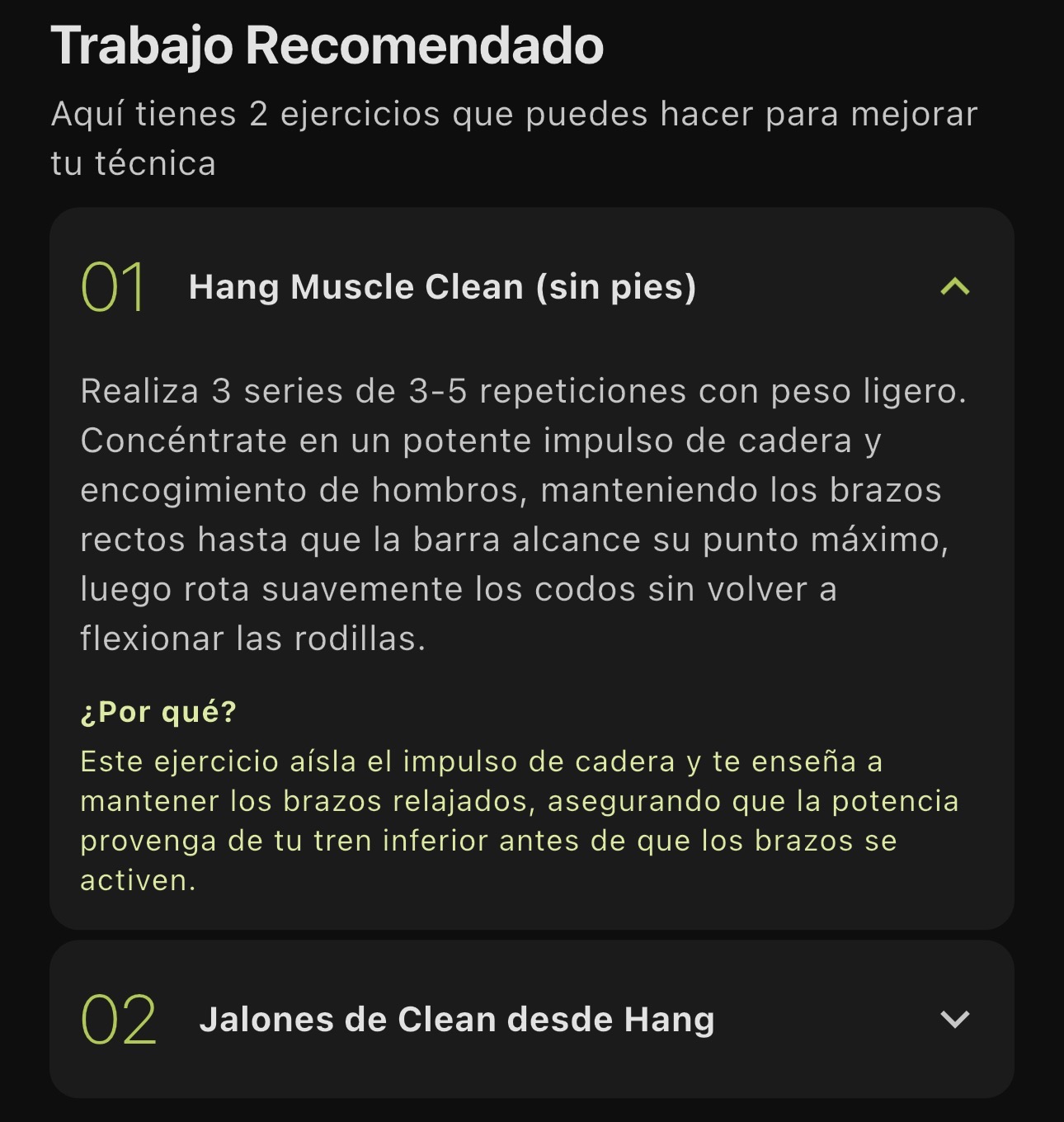
Based on your analysis, the AI suggests specific exercises to work on in your next session. Every exercise comes with:
- Recommended sets and reps
- The “why”: how that exercise will help you fix your weak point
No more guessing what to do next: you get a concrete plan.
🌙 Dark mode, refreshed
New color palette optimized for OLED screens: purer blacks to save battery, better contrast and vibrant colors that keep the FITIZENS identity. Great for training in low-light gyms.
⚖️ Improved weight selector
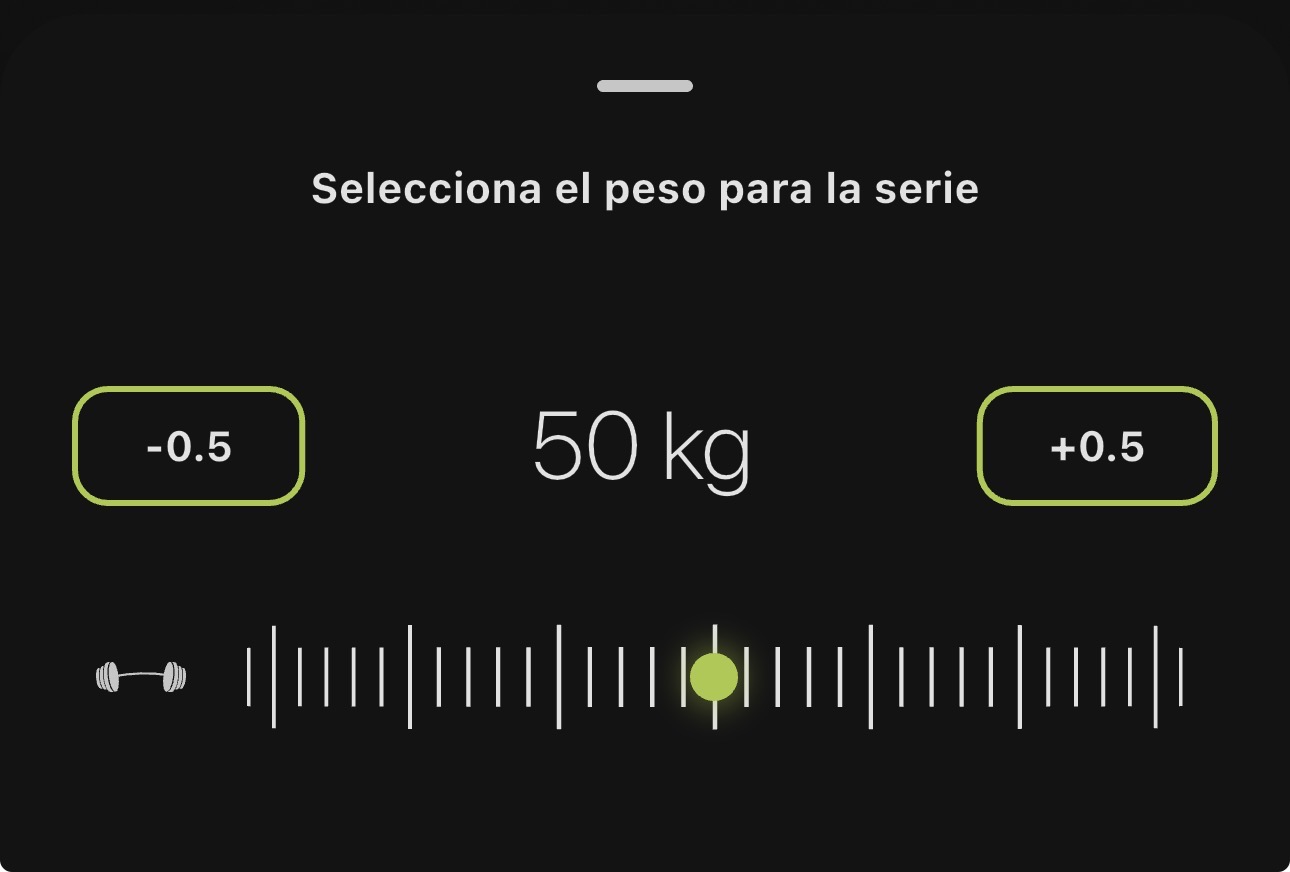
- Steppers for fine tuning: +/- buttons to move from 32.5 kg to 35 kg without dragging
- Kettlebell support: the selector now shows up correctly for every kettlebell exercise
🔔 Other improvements
- Analysis limit notification: you know exactly how many analyses you have left
- Stripe billing portal: manage your plan directly from the web portal
- Outdated summary: if you add more sets after generating the summary, a banner lets you regenerate it
🔧 Fixes and stability
- More reliable 1080p video uploads
- App start without a login flash
- Volume calculation fixed (now includes every attempt)
- Stable navigation when leaving your profile
- Account deletion now works
- First install no longer hangs on the splash screen
Update now and hear what your AI coach has to say about your training.
4.1.0 - More visual technique analysis and smarter search
This update makes a real difference in how you read your technique and how you find exercises. A more visual interface for your analysis and a more powerful search to explore our catalog of 500+ exercises.
🎯 Technique analysis, redesigned
The set summary screen now shows your technical level in a much clearer, more intuitive way.
New visual quality bar
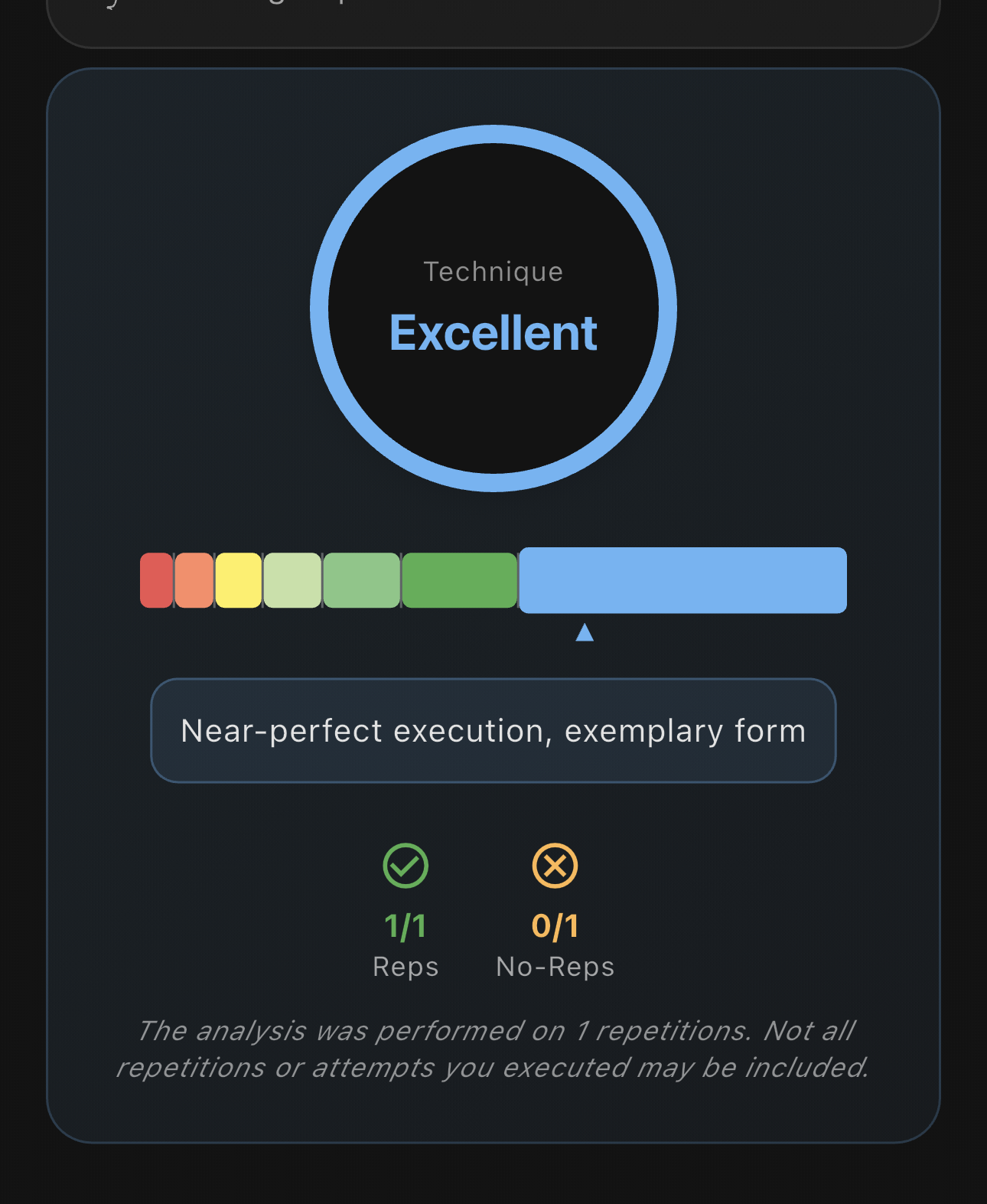
Your technique score is now shown on a color bar that goes from red (unsafe execution) to blue (excellent technique). The indicator tells you exactly where you stand, with a clear label for your current level.
Explore the quality ranges in detail
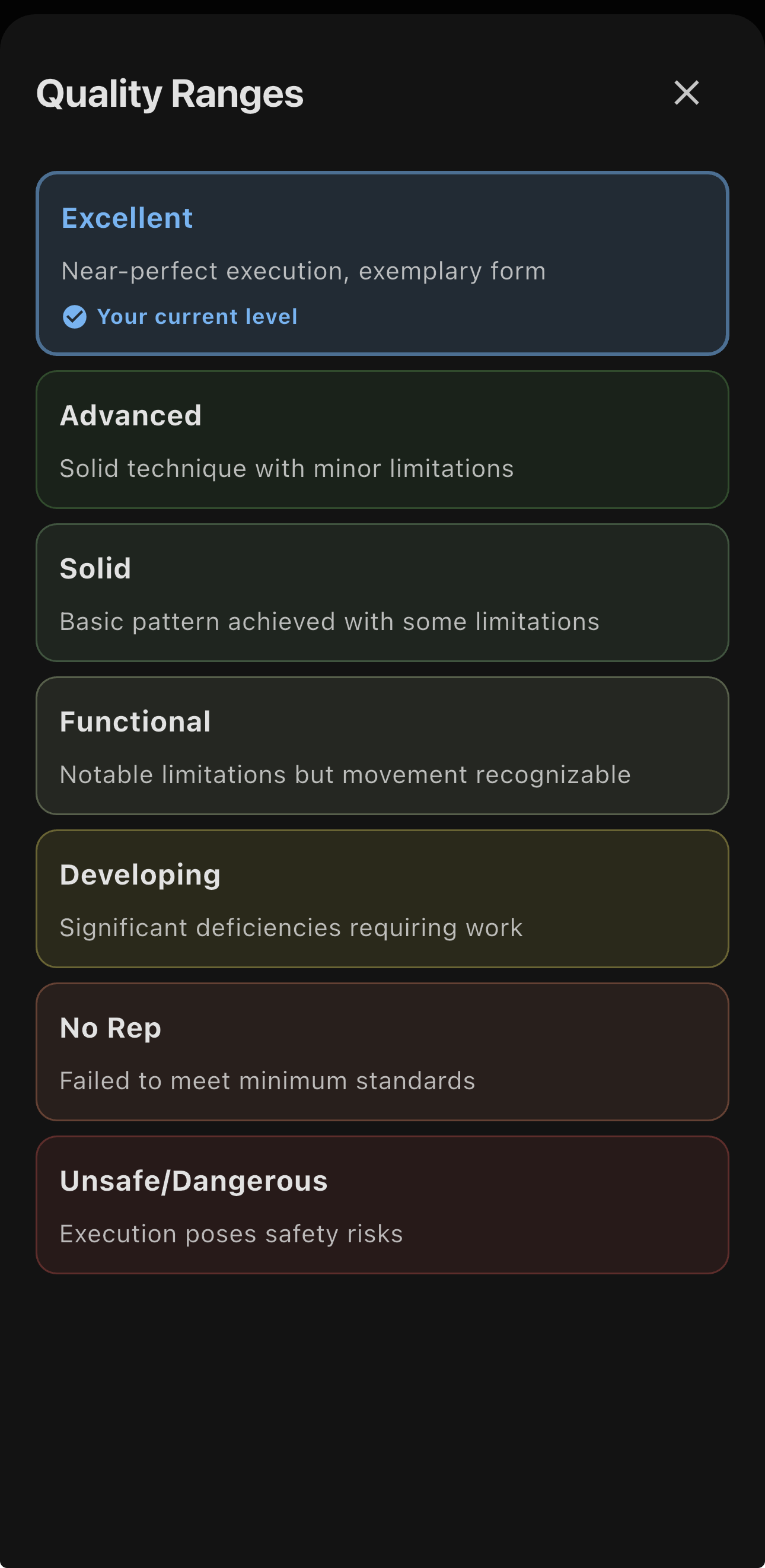
Want to know what each level means? Tap the info button to see the full breakdown of the 7 quality ranges:
- Excellent: near-perfect execution, textbook technique
- Advanced: solid technique with minor limitations
- Solid: basic pattern nailed with some limitations
- Functional: noticeable limitations but movement is recognizable
- Developing: significant gaps that need work
- No Rep: doesn’t meet the minimum standards
- Unsafe/Dangerous: execution with injury risk
Each range comes with a detailed description and, more importantly, you can clearly see your current level so you know where you stand and where to go next.
🔍 Exercise search, fully rebuilt
Finding the exercise you want is now much faster and easier.
New smart filters panel
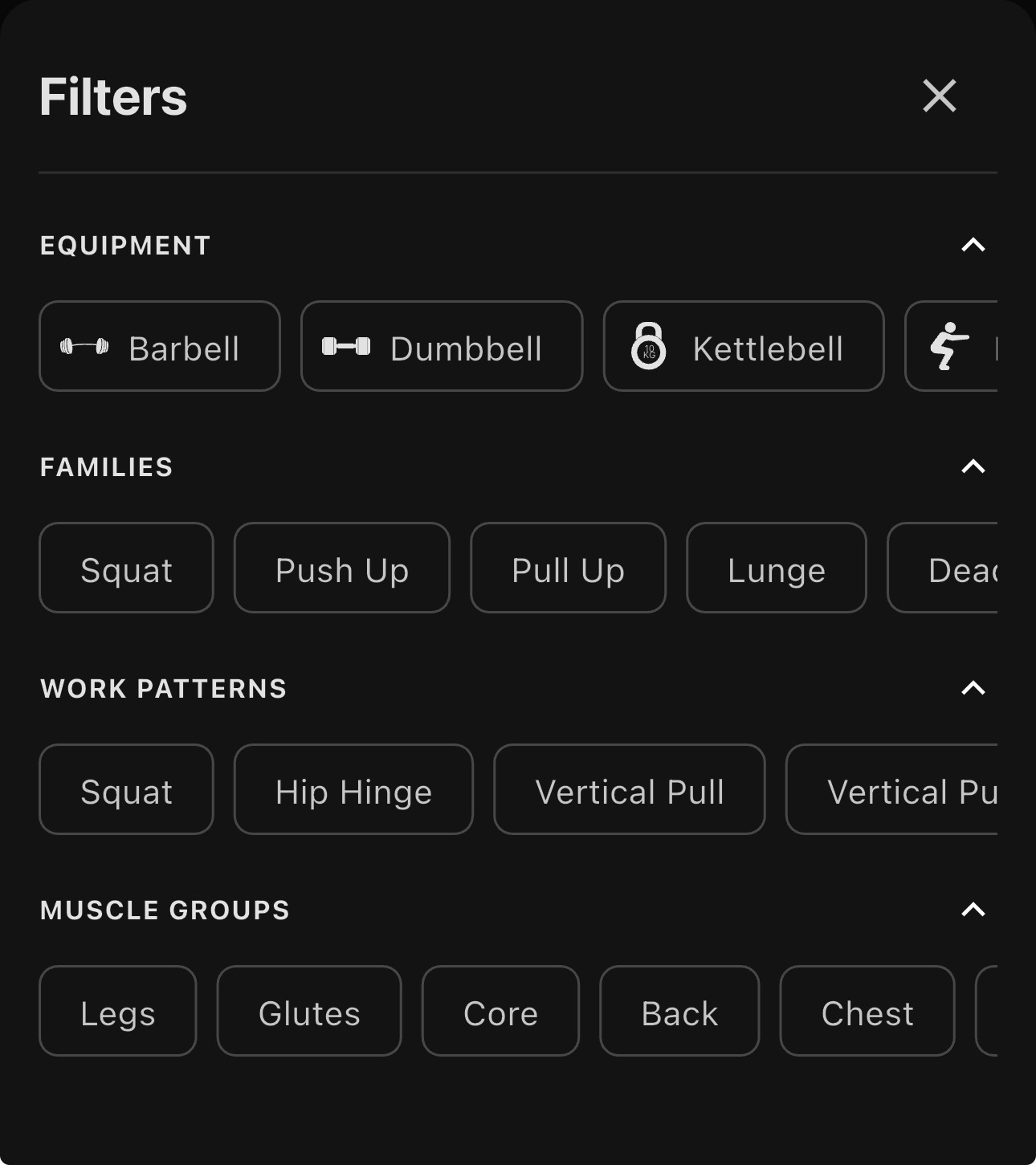
Filter exercises by several criteria at once:
- Equipment: barbell, dumbbells, kettlebell, bodyweight…
- Exercise families: Squat, Push Up, Pull Up, Lunge, Deadlift…
- Movement patterns: squat, hip hinge, vertical pull, push…
- Muscle groups: legs, glutes, core, back, chest…
Organized family navigation
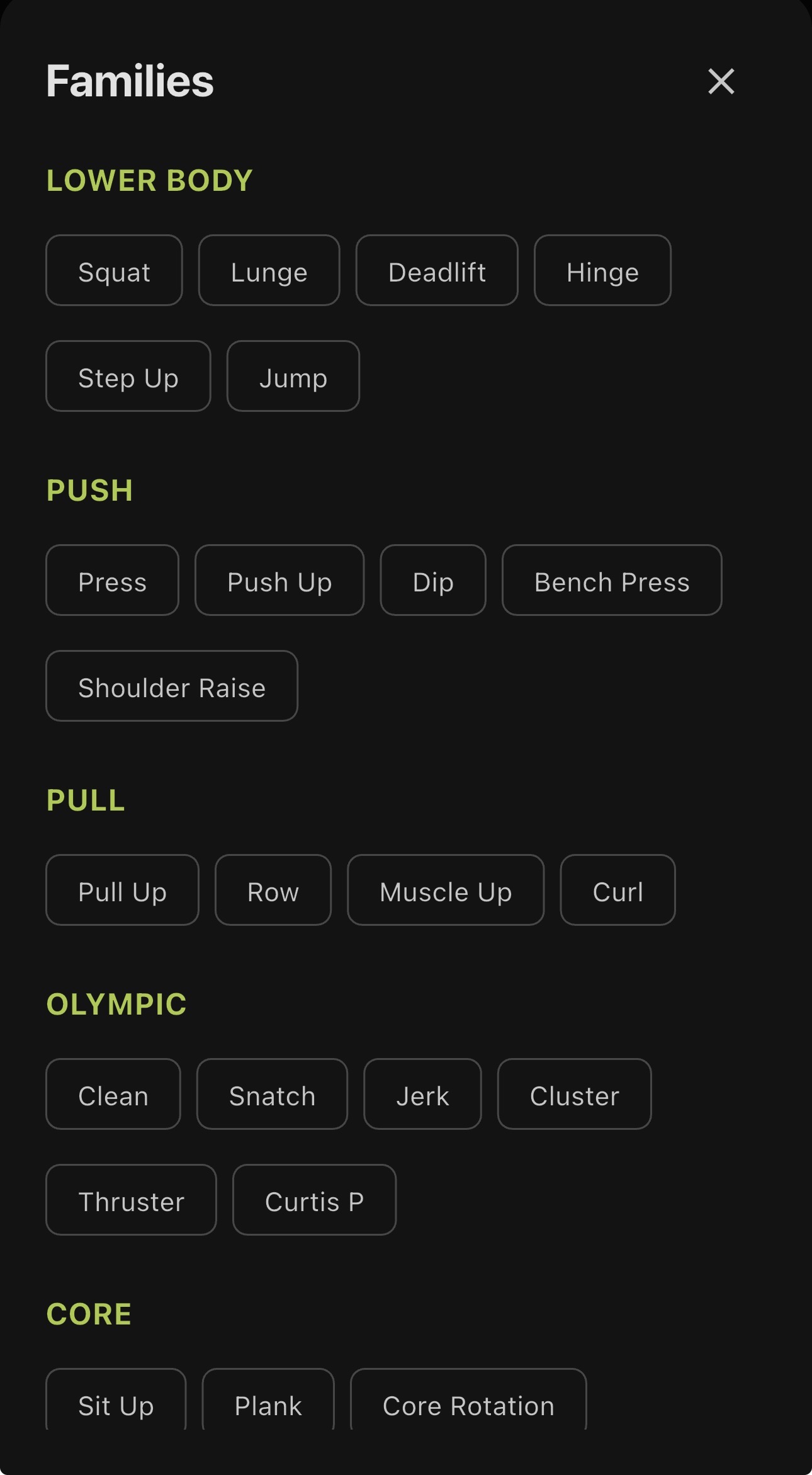
Exercises are now organized into clear families: Lower Body, Push, Pull, Olympic and Core. Each family groups related exercises so you can explore variations and find exactly what you need.
🔧 Other improvements
Better handling of sets with no detected reps: you now get clearer information when a set has no valid reps, helping you understand what happened.
Tuned colors for better visibility: we adjusted the color palette across the analysis interface so the indicators are more legible and the information stands out.
Update now and see your technique in a more visual way. As always, your feedback keeps us improving.
4.0.0 - Your personal AI Video Coach on every rep
Today is a before-and-after moment for FITIZENS. Version 4.0 isn’t just another update. It’s a full rethink of how you understand and sharpen your technique.
Imagine having a professional coach watching every rep, every movement, every detail of your form. Now you do. And everything you need is already in your pocket: your phone.
🎬 Video Coach: your personal AI trainer
The centerpiece of this release is Video Coach, a new technology that turns your camera into an expert movement analyst.
How it works:
- Record your exercise while you train (any exercise, any angle)
- Get your automatic report generated by our AI trained on sports biomechanics
- Review your technique with detailed feedback on every single rep
What’s in your analysis?
- ✅ Execution quality: rep-by-rep breakdown of your movement
- 💪 Strengths detected: what you’re already doing well and should keep doing
- 📈 Specific areas to improve: precise technical corrections to level up your performance
- 🎯 Personalized cues: practical tips to progress faster
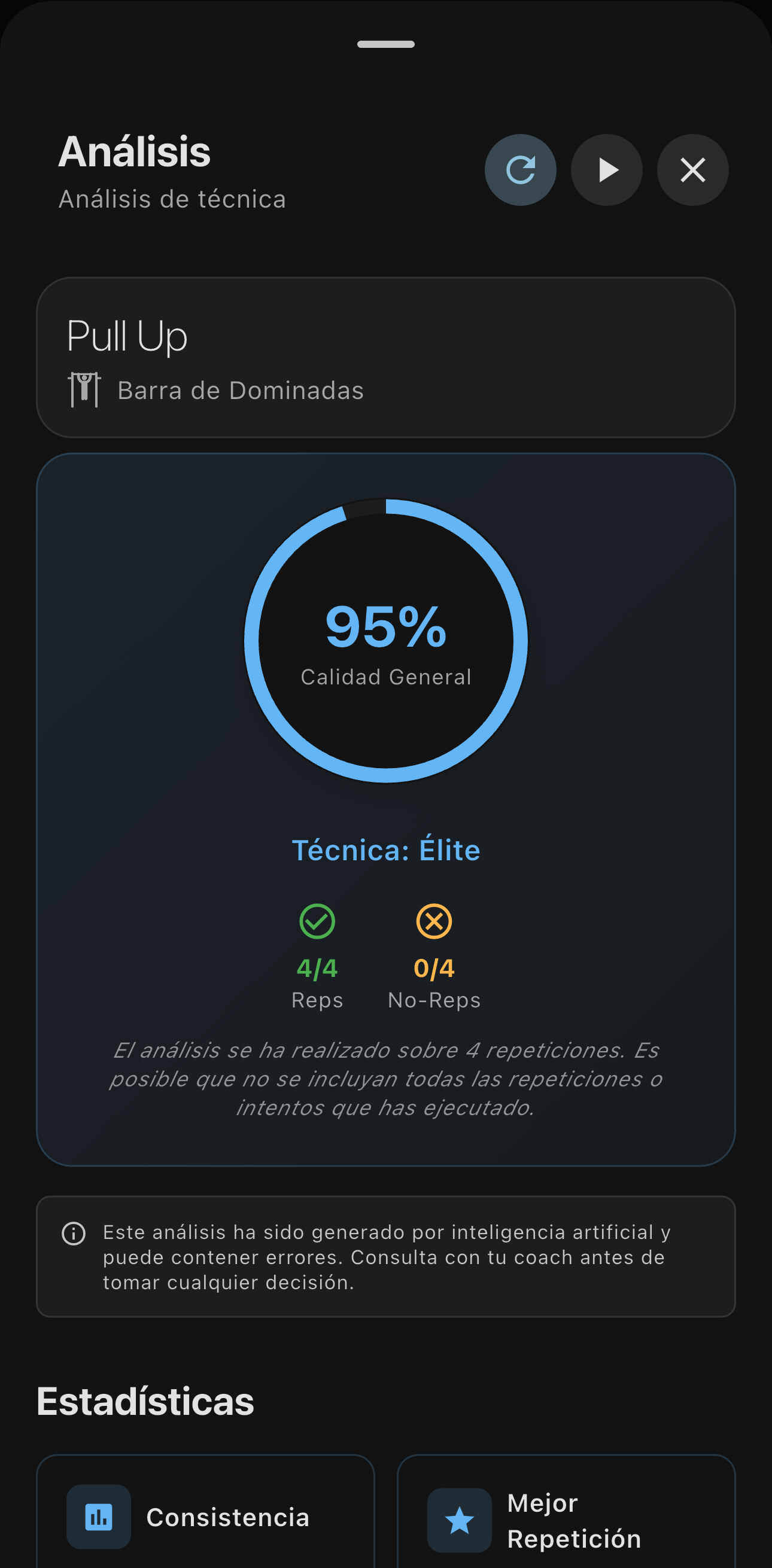
When your set is done, you get a full summary with your overall score and technical classification.
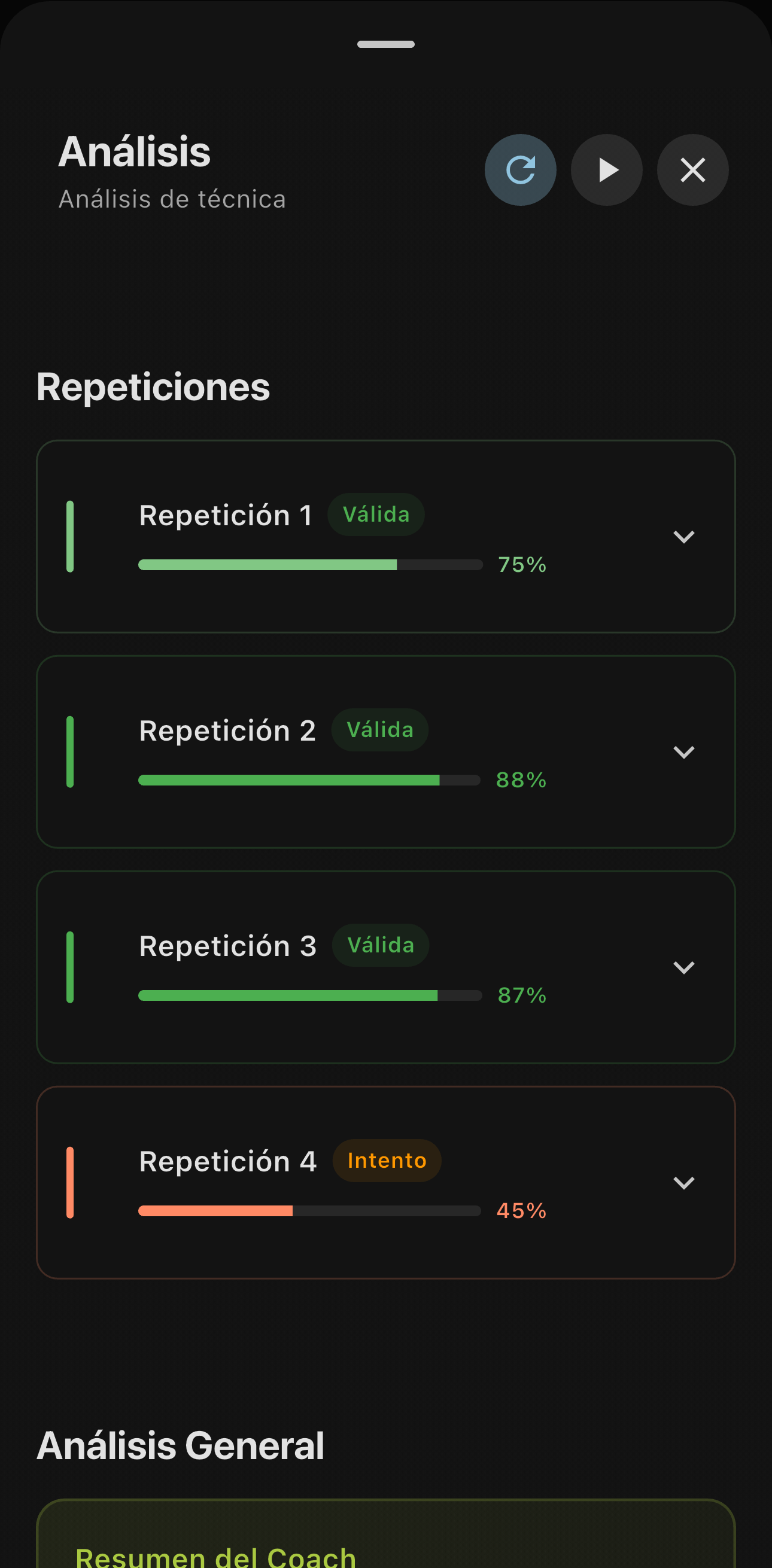
Every rep gets its own quality score and specific feedback on your technique.
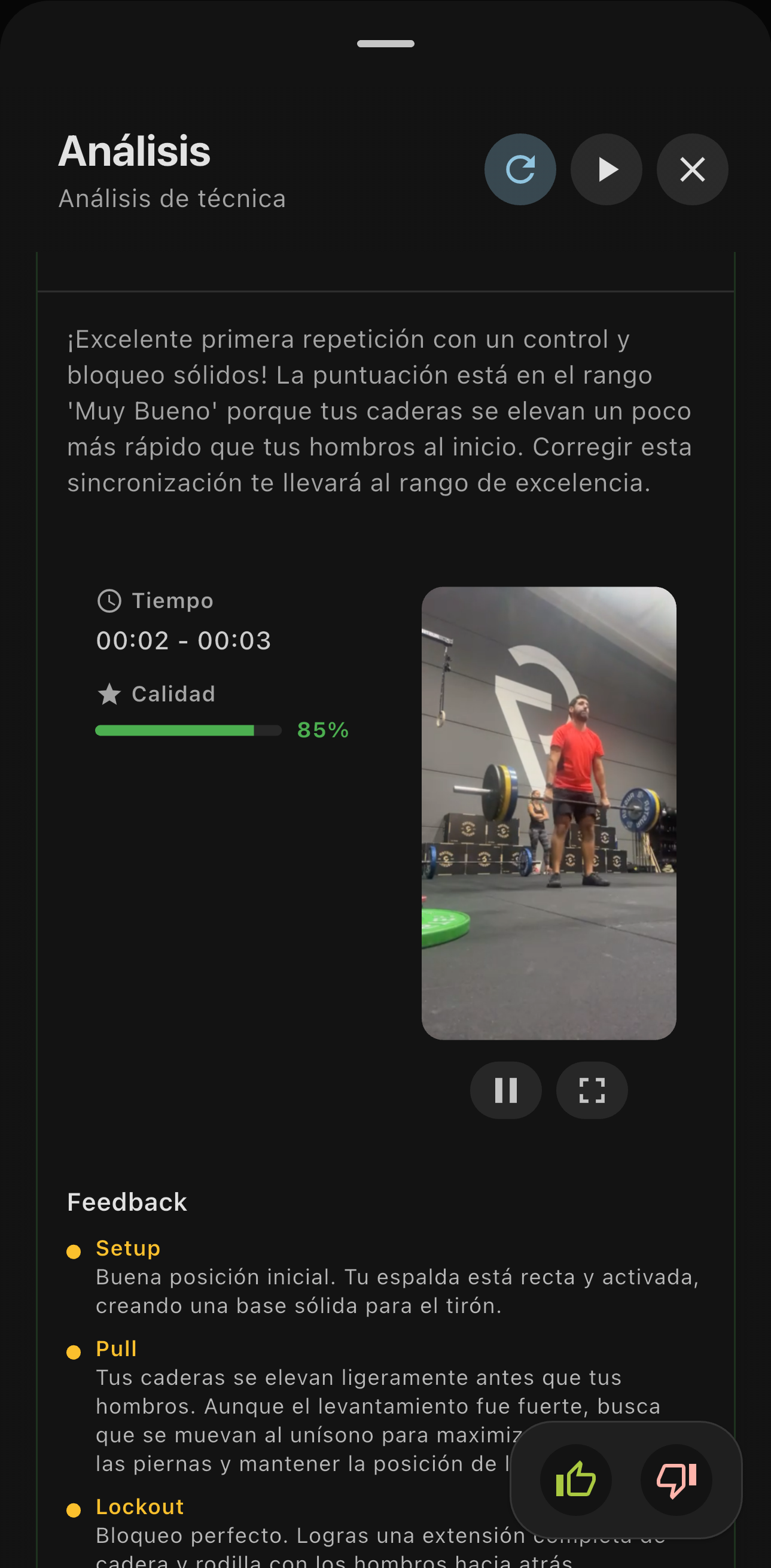
Dive into the detailed analysis of each rep to understand exactly what to adjust.
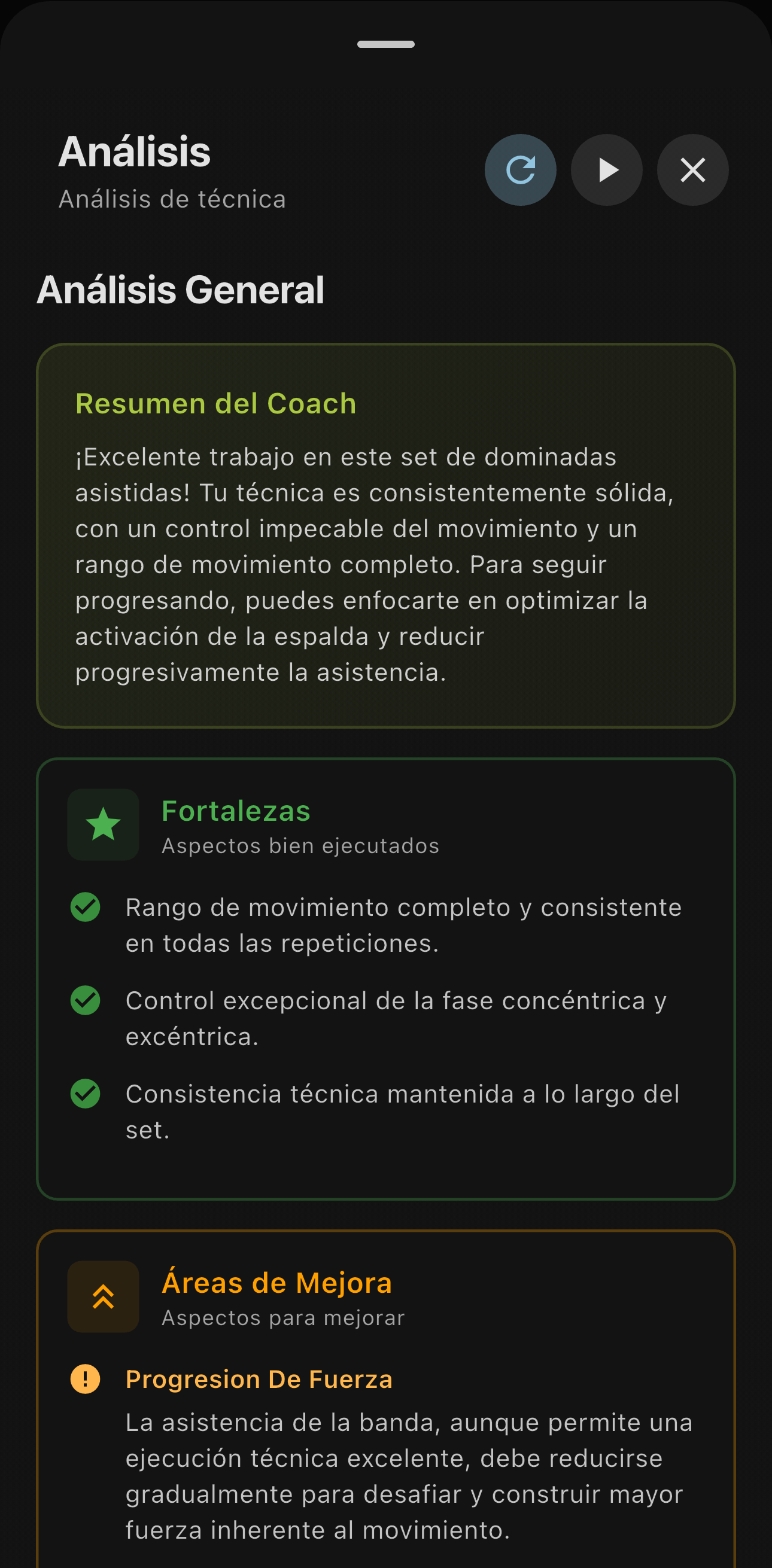
And get an overall analysis with the strengths the AI spotted and concrete next steps for your next session.
Works for every level: from beginners learning the movement to advanced athletes polishing every detail.
🎯 Expanded catalog: 500+ AI-detectable exercises
Our AI now recognizes over 500 different exercises, nearly 4x more than the previous version (we went from 130 to 500+).
That means practically any exercise you do at the gym can be analyzed precisely by Video Coach. From the classic lifts to advanced variations, FITIZENS AI is ready to read your movement and give you the sharpest technical feedback possible.
♻️ Radical simplification
FITIZENS 4.0 is cleaner, more direct, more effective. We removed the noise so you can focus on the one thing that matters: improving your technique and performance.
The new interface is built to take you from training to analysis in seconds. No unnecessary steps, no complicated menus, no wasted time.
📱 Train with what you already have: your phone
One of the biggest shifts in this release is that you can now use FITIZENS with just your phone camera. No extra hardware, no complex setup.
Open the app, record your exercise and get precise technique analysis. That simple.
More accessible. More immediate. More focused on what matters: your progress.
🚀 Why this changes everything
This isn’t an incremental update. It’s the result of rethinking from scratch what it means to train with technology.
Record. Analyze. Improve. That simple. That effective.
The technical feedback you used to only get with a personal trainer is now in the palm of your hand. Every day. Every session. Every exercise.
💡 Our vision
FITIZENS 4.0 is built on the belief that the best technology is the one that disappears. We don’t want you thinking about the app while you train. We want you training better, progressing faster, avoiding injuries and hitting your goals with confidence.
Video Coach is only the beginning of this new era.
Ready to train with your personal AI coach? Update now and turn every rep into a chance to improve.
Your technique will thank you. So will your results.
As always, your feedback is essential to keep building the future of smart training. Tell us what you think of this new version.

Stop Training Blind. Start Improving Today.
Download FITIZENS and get 10 analyses completely free. No credit card, no commitment.




✓ 10 free analyses on install • No credit card needed